The Accelerator – Executive Summary report provides a high-level assessment of your virtual infrastructure, helping you understand your current environment and identify areas that may impact migration planning.
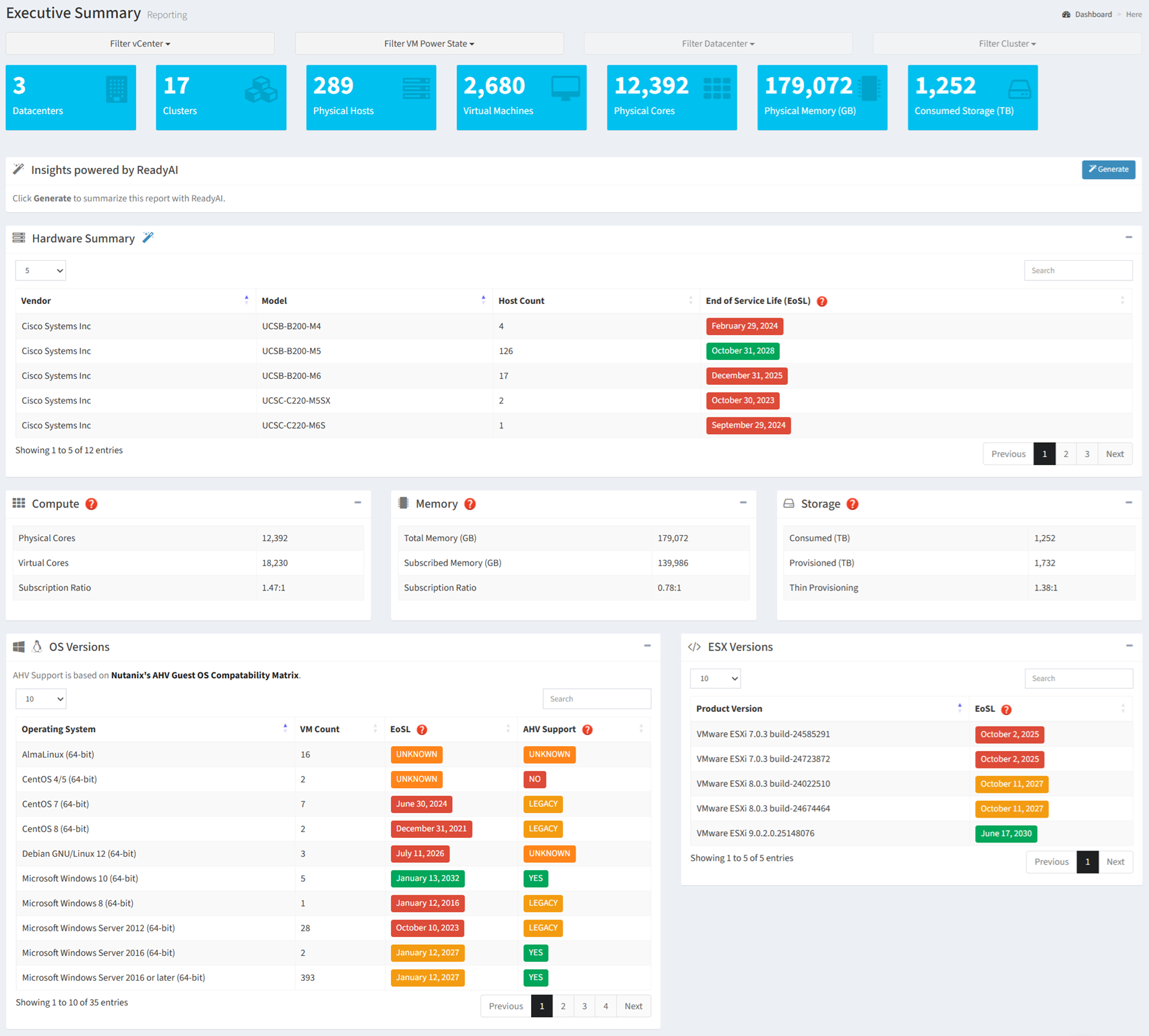
Available operations:
- View a high-level summary of the virtual estate
- Filter the report by vCenter, VM Power State, Datacenter, and Cluster
- Generate an AI-powered summary of the report by clicking the Generate button
- View hardware inventory and End of Service Life (EoSL) information
- Retrieve and populate hardware End of Service Life (EoSL) dates by clicking the
 icon
- View infrastructure capacity and utilization metrics
- View guest operating system versions, End of Service Life (EoSL) information, and AHV compatibility
- View VMware ESXi versions and End of Service Life (EoSL) information
Overview
The Executive Summary report provides a high-level assessment of your virtual infrastructure. It answers three fundamental planning questions:
- What do I have? (inventory and topology)
- Is it healthy? (EoSL, compatibility, utilization)
- What do I need for the target platform? (CPU, memory, storage, and compatibility requirements for the target platform)
The report consolidates inventory, utilization, lifecycle, and compatibility information into a single view, allowing you to quickly assess migration readiness and estimate target platform requirements.
Key Benefits
- Understand the size and composition of your virtual infrastructure
- Identify deployed hardware, operating systems, and ESXi versions
- Estimate CPU, memory, and storage requirements for the target platform
- Identify hardware and software approaching or past End of Service Life (EoSL)
- Review guest operating system compatibility with Nutanix AHV
- Generate AI-powered insights and recommendations
The following sections describe how the information presented in the Executive Summary can be used to estimate compute, memory, storage, and compatibility requirements for a target platform.
Capacity Planning and Sizing
Use the information in this report to establish a baseline for sizing a target platform. Compute, memory, storage, hardware lifecycle, and software compatibility metrics help determine the capacity and infrastructure required to support migrated workloads.
| Report Section | Key Metrics | How It Helps Size the Target Platform |
|---|
| Compute | Physical CPU cores, Virtual CPU cores, CPU subscription ratio | Evaluate CPU utilization and oversubscription, estimate required physical cores, and determine appropriate CPU consolidation ratios for the target platform. |
| Memory | Total memory, Subscribed memory, Memory subscription ratio | Assess memory utilization and oversubscription to estimate the memory capacity required for the target platform. |
| Storage | Consumed storage, Provisioned storage, Thin provisioning ratio | Estimate storage capacity requirements, evaluate thin provisioning efficiency, and determine appropriate storage overcommitment ratios. |
| Hardware Summary | Hardware vendor, Server model, Host count, End of Service Life (EoSL) | Understand the current hardware footprint, identify servers nearing or past EoSL, and determine whether a hardware refresh should be included in the migration plan. |
| OS Versions | Guest operating systems, VM counts, Operating system EoSL, Nutanix AHV compatibility | Identify operating systems that require upgrades, determine AHV compatibility, and identify potential migration blockers before sizing the target environment. |
| ESXi Versions | VMware ESXi versions, End of Service Life | Identify outdated ESXi versions, determine upgrade requirements, and evaluate opportunities to modernize the virtualization platform during migration. |
Sizing Metrics
| Resource | Used For |
|---|
| Physical Hosts | Estimate host consolidation opportunities |
| Physical CPU Cores | Establish the compute baseline |
| Virtual CPU Cores | Calculate target CPU requirements |
| Memory | Estimate target memory capacity |
| Storage | Estimate target storage capacity |
| Virtual Machines | Estimate migration effort and platform scale |
EXAMPLE: If the current environment contains 18,230 vCPUs and the target CPU subscription ratio is 3:1, approximately 6,077 physical CPU cores would be required before applying availability, resiliency, or growth factors.
Typical Workflow
The following workflow provides a recommended approach for using the Executive Summary report during migration planning.
- Review the overall infrastructure footprint.
- Retrieve hardware End of Service Life (EoSL) dates.
- Identify hardware requiring refresh.
- Review operating system compatibility.
- Evaluate CPU, memory, and storage utilization.
- Estimate target platform requirements.
- Generate an AI summary for planning and stakeholder discussions.
This workflow represents a recommended starting point. Depending on your migration objectives, you may revisit individual sections of the report throughout the assessment process.
Understanding Status Indicators
Several sections of the Executive Summary report use color-coded indicators to quickly identify hardware lifecycle, operating system support, and platform compatibility.
Hardware End of Service Life (EoSL)
The Hardware Summary section displays the support lifecycle for each physical server model.
| Status | Meaning |
|---|
| Green | More than two years remain before the hardware reaches End of Service Life. |
| Amber | The hardware will reach End of Service Life within the next two years. |
| Red | The hardware has reached End of Service Life and should be evaluated for replacement. |
Operating System End of Service Life (EoSL)
The OS Versions section displays the support lifecycle for each guest operating system.
| Status | Meaning |
|---|
| Green | More than two years remain before the operating system reaches End of Service Life. |
| Amber | The operating system will reach End of Service Life within the next two years. |
| Red | The operating system has reached End of Service Life and should be upgraded or replaced before migration. |
| Orange | An End of Service Life date could not be determined for the operating system. |
VMware ESXi End of Service Life (EoSL)
The ESXi Versions section displays the support lifecycle for each VMware ESXi version detected in the environment.
| Status | Meaning |
|---|
| Green | More than two years remain before the ESXi version reaches End of Service Life. |
| Amber | The ESXi version will reach End of Service Life within the next two years. |
| Red | The ESXi version has reached End of Service Life and should be upgraded. |
| Orange | An End of Service Life date could not be determined for the ESXi version. |
Nutanix AHV Compatibility
The AHV Support column indicates whether each guest operating system is supported on the selected Nutanix AHV/AOS release.
| Status | Meaning |
|---|
| Green (Supported) | Fully supported by Nutanix for the selected AHV/AOS release. |
| Amber (Legacy Support) | Supported through legacy validation. The operating system may no longer be supported by its vendor but has been validated by Nutanix for migration and compatibility scenarios. |
| Red (Unsupported) | Not supported for the selected AHV/AOS release. |
| Orange (Unknown) | AHV support cannot be determined for the operating system. |