The Accelerator – VM Classification report provides a summary of virtual machine classifications across your environment. Use this report to understand how workloads are distributed between Virtual Desktop Infrastructure (VDI) and Corporate (Corp) virtual machines, helping you assess workload composition and estimate resource requirements for migration planning.
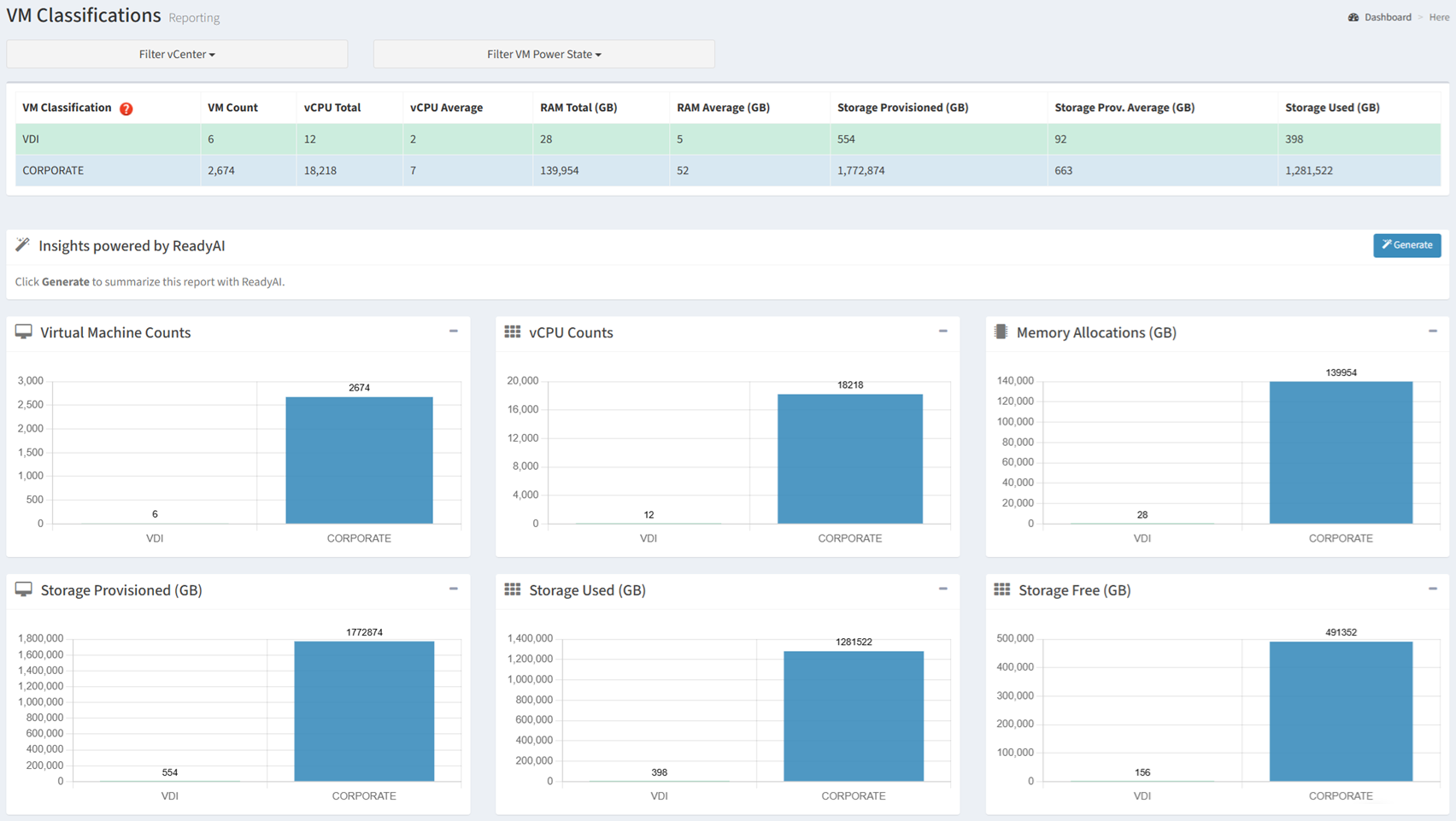
Available operations:
- View the distribution of virtual machines by classification (VDI and Corporate)
- Filter the report by vCenter and VM Power State
- Generate an AI-powered summary of the report by clicking the Generate button
- Compare virtual machine counts by classification
- Compare vCPU allocation by classification
- Compare memory allocation by classification
- Compare provisioned storage by classification
- Compare used storage by classification
- Compare available storage by classification
Overview
The VM Classification report provides a summary of workload distribution across your virtual environment. It answers three important planning questions:
- What types of workloads do I have? (VDI versus Corporate)
- How are resources distributed? (virtual machines, CPU, memory, and storage)
- How will workload composition affect the target platform? (resource allocation and capacity planning)
The report consolidates workload classification and resource utilization into a single view, allowing you to compare infrastructure consumption across VDI and Corporate workloads and identify the primary consumers of compute, memory, and storage resources. Understanding workload composition helps determine whether VDI and Corporate workloads should be migrated together or planned in separate migration waves based on their resource requirements.
Key Benefits
- Understand the distribution of VDI and Corporate workloads
- Compare compute, memory, and storage allocation by workload classification
- Identify which workload type consumes the most infrastructure resources
- Estimate workload-specific capacity requirements for the target platform
- Generate AI-powered insights and recommendations
The following sections describe how the information presented in the VM Classification report can be used to estimate workload-specific compute, memory, and storage requirements for the target platform.
Migration Planning
Use the information in this report to understand how infrastructure resources are allocated between VDI and Corporate workloads. This information helps estimate target platform resource requirements and determine whether VDI and Corporate workloads should be migrated or sized independently.
| Report Section | Key Metrics | Planning Value |
|---|
| VM Count | Number of VDI and Corporate virtual machines | Estimate migration effort and workload distribution. |
| vCPU Allocation | Total and average virtual CPUs | Estimate compute requirements by workload type. |
| Memory Allocation | Total and average assigned memory | Estimate memory requirements by workload type. |
| Storage Provisioned | Total provisioned storage | Estimate storage allocation requirements. |
| Storage Used | Total consumed storage | Estimate storage capacity requirements. |
| Storage Available | Available storage capacity | Evaluate available capacity and future growth. |
Planning Metrics
| Resource | Used For |
|---|
| VM Count | Estimate migration effort by workload type |
| vCPU | Estimate compute requirements |
| Memory | Estimate memory requirements |
| Provisioned Storage | Estimate provisioned storage requirements |
| Used Storage | Estimate storage capacity requirements |
| Available Storage | Evaluate available storage capacity and future growth |
Typical Workflow
The following workflow provides a recommended approach for using the VM Classification report during migration planning.
- Review the distribution of VDI and Corporate workloads
- Compare virtual machine counts by classification
- Evaluate CPU, memory, and storage allocation for each workload type
- Identify which workload type consumes the majority of compute, memory, and storage resources.
- Use workload-specific resource information to estimate target platform requirements.
- Generate an AI summary for planning and stakeholder discussions
This workflow represents a recommended starting point. Depending on your migration objectives, you may revisit individual sections of the report as your assessment progresses.