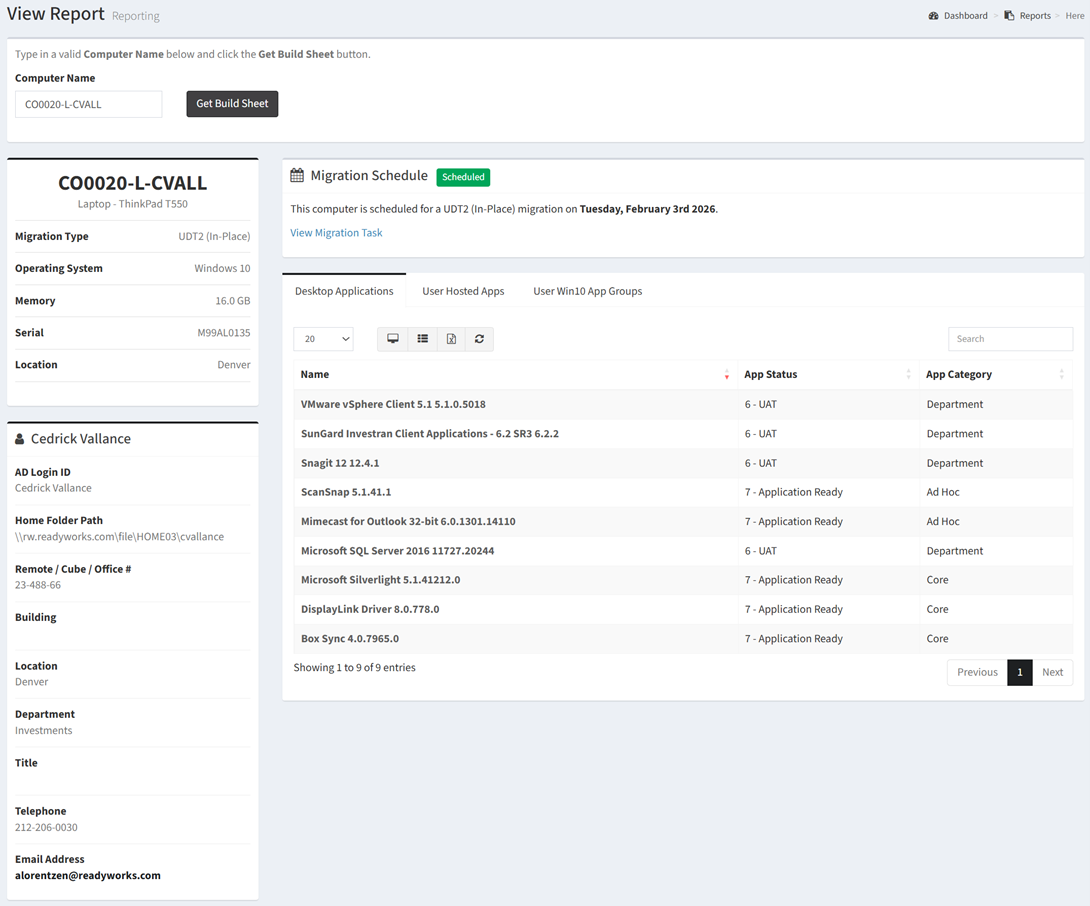
The Build Sheet report shows a Deployment Build Sheet by Computer.
| Data Types | Required Fields |
| Computer | Name, Computer Model, Computer Model, Supported, Operating System, Memory GB, Serial, Location |
| User | Name, AD Login ID, Home Folder Path, Remote / Cube / Office #, Title, Department, Telephone, Email |
| Application | Name, App Status, App Category, Win10 App Group |
| Hosted App | Name |
| Win10 App Group | Name, Description |
Available operations:
- To run the report, enter a computer name in the Computer Name box and click the Get Build Sheet button
- View a deployment build sheet for the entered computer
- Columns available
- Computer – Information about the entered computer
- Computer Name – Name of the computer
- Computer Type – Type of the computer (e.g. Desktop, Laptop)
- Computer Model – Model of the computer
- Migration Type – Type of the migration (Swap, In-Place)
- Operating System – Operating system of the computer
- Memory – Memory on the computer in gigabytes
- Serial – Serial number of the computer
- Location – Location of the computer
- User – Information about the user linked to the entered computer
- User Name – Name of the user
- AD Login ID – AD login ID of the user
- Home Folder Path – Home folder path of the user
- Remote / Cube / Office # – Office location of the user
- Title – Title of the user
- Department – Department of the user
- Telephone – Telephone of the user
- Email Address – Email address of the user
- Migration Schedule – Information about migration scheduling
- Scheduling Status – Scheduling status of the user (Scheduled, Not Scheduled)
- Migration Date – Scheduled migration date of the user, if scheduled
- Migration Task – Link to the migration task, if scheduled
- Desktop Applications – List of the applications linked to the computer
- Application Data Type Specific Columns – Columns specific to the application data type
- User Hosted Apps – List of the hosted apps linked to the user
- Hosted App Data Type Specific Columns – Columns specific to the hosted app data type
- User Win10 App Groups – List of the Win10 app groups linked to the user
- Win10 App Group Data Type Specific Columns – Columns specific to the Win10 app group data type
- You can also change the number of visible rows in the table, view full screen, export to CSV or Excel, refresh the table, and search for text