NOTE: This features was deprecated in version 8.1.0106.
The ConnectionSettings tab provides the ability to view and configure connectivity between ReadyWorks and an LDAP provider in non Microsoft-centric environments.
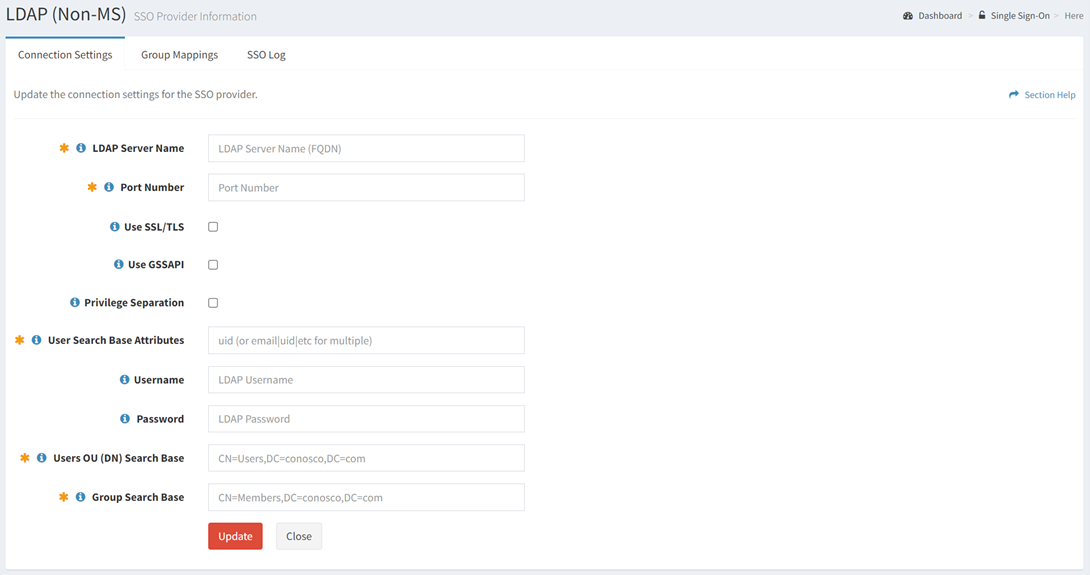
Available operations:
- View and update the connection settings
- Fields available
- LDAP Server Name – Hostname of the LDAP server
- Port Number – Port used to connect to the LDAP server
- Use SSL/TLS – Choose if SSL/TLS is used
- Use GSSAPI – Choose if GSSAPI is used
- Privilege Separation – Choose if privilege separation is used. When enabled, the Username and Password attributes are used to retrieve them.
- User Search Base Attributes – Attribute of the User Search Base to use for account searches
- Username – User account used to connect to the LDAP server
- Password – Password of the user account used to connect to the LDAP server
- Users OU (DN) Search Base – Users Organizational Unit (OU) Distinctive Name (DN) to use for account searches
- Group Search Base – Groups search base to use for group attribute searches
Update Connection Settings
From the Connection Settings tab, you can update the connection settings. To update:
- Enter or select a value for each connection setting
- Click the Update button to save the connection settings