From the Inbound Jobs tab, you can create new inbound jobs. To create:
- Click the New Inbound Job button to bring up the New Inbound Job dialog
- Enter the properties of the new inbound job (available job fields differ by connector)
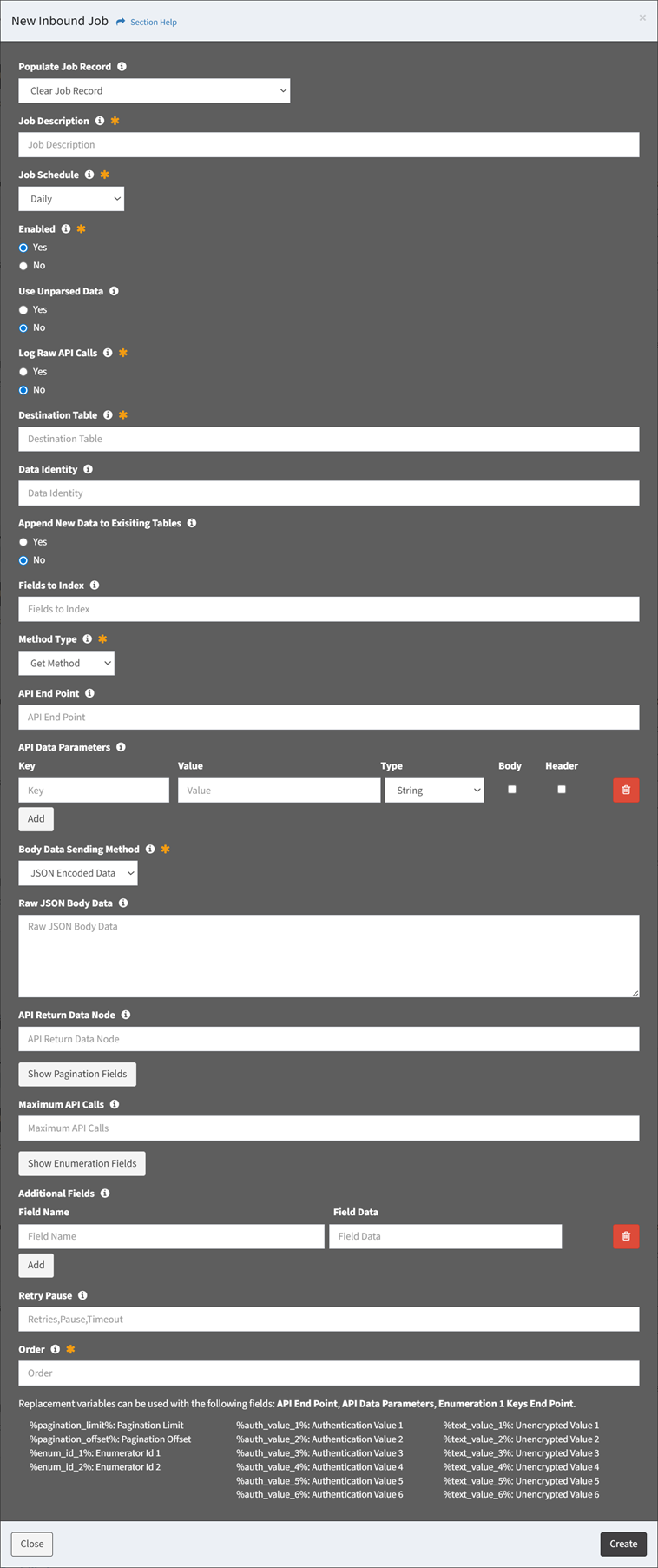
- Populate Job Record – Choose how to populate the job (required)
- Clear Job Record – Start with an empty record
- Use Template – Start with a template job
- Clone Job – Start with a clone from an existing job
- Job Description – Description of the job (required)
- Job Schedule – Choose the frequency the job will run (required)
- Hourly
- Daily
- Weekly
- Every 5 Minutes
- Every 15 Minutes
- Every 30 Minutes
- Custom
- Enabled – Choose if job is enabled (required)
- Use Unparsed Data – Choose if incoming data is parsed or left in its raw format (optional)
- Log Raw API Calls – Choose if raw API calls are logged (required)
- Allow Empty Table – Choose if an empty table is allowed (required)
- Destination Table – Name of the destination table (e.g., my_table_cm_computer) (required)
- Data Identity – Identity of the data for dashboards (e.g., cm_computer) (optional)
- XML Envelope Payload – XML envelope payload of the SOAP call (optional)
- Data Selection – Connector specific data selection command of the job (optional)
- CSV/JSON/XML File or Path – CSV/JSON/XML file or path (optional)
- Append Files to Same Destination Table – Choose if multiple files in the same path will append to the same destination table, or will create a new destination table for each file (optional)
- Append New Data to Existing Tables – Choose if new data will append to the same destination table, or will create a new destination table (optional)
- Fields to Index – Fields to index (optional)
- Request Unique Key Field – Request unique key field of the job (optional)
- Request Sort By Field – Field to sort the job by (databases only) (optional)
- Request Limit – Request limit of the job (optional)
- Method Type – Method type of the job (GET, POST, PUT, PATCH, DELETE) (required)
- API End Point – API end point of the job (optional)
- API Data Parameters – API data parameters of the job (optional)
- Enter Key and Value and select Type (String, Numeric, Boolean) for each API data parameter
- Check Body if the API data parameter is passed through the body rather than the URI (Uniform Resource Identifier)
- Check Header if the API data parameter is passed through the header rather than the URI (Uniform Resource Identifier)
- Click the Add button to add API data parameters
- Click the Delete button to delete API data parameters
- Body Data Sending Method – Method for sending the body data of the job (JSON Encoded Data, Form Data) (required)
- Raw JSON Body Data – Raw JSON body to send. Do not use body selections in the API Parameters if this is used. (optional)
- API Return Data Node – API return data node of the job (optional)
- Ignore XML Attributes – Choose if field attributes are ignored and not included in the data when parsing XML (optional)
- Click Show Pagination Fields to enter pagination properties of the job. Click Hide Pagination Fields to hide pagination fields.
- Pagination Type – Paging type of the job (Records, Pages, Next Record Node, Next Page Node) (optional)
- API Pagination Node – API pagination node of the job (Next Page, Next Node) (optional)
- Pagination Offset Start – Request paging offset start or data node of the job (optional)
- Pagination Limit – Request pagination limit of the job (optional)
- Pagination Termination Node – Pagination termination node of the job (optional)
- Maximum API Calls – Limit of API calls that can be made by the job to avoid an endless loop (optional)
- Click Show Enumeration Fields to enter enumeration properties of the job. Click Hide Enumeration Fields to hide enumeration fields.
NOTE: Triple enumeration is supported.- Enumeration 1 Type – Enumeration type of the job (API End Point, Other ETL Job, Data Type, External Data) (optional)
- API End Point
- Enumeration 1 Keys End Point – Enumeration keys end point of the job (optional)
- Enumeration 1 Node – Enumeration node of the job (optional)
- Enumeration 1 Fields – Enumeration fields of the job (optional)
- Other ETL Job
- Enumeration 1 ETL Job – ETL job for the enumeration values of the job (optional)
- Enumeration 1 Fields – Enumeration fields of the job (optional)
- Data Type
- Enumeration 1 Data Type – Data type and fields of the enumeration values (optional)
- External Data
- Enumeration Key – Enumeration key of the job (optional)
- Enumeration 2 Type – Enumeration type of the job (API End Point, Other ETL Job, Data Type) (optional)
- API End Point
- Enumeration 2 Keys End Point – Enumeration keys end point of the job (optional)
- Enumeration 2 Node – Enumeration node of the job (optional)
- Enumeration 2 Fields – Enumeration fields of the job (optional)
- Other ETL Job
- Enumeration 2 ETL Job – ETL job for the enumeration values of the job (optional)
- Enumeration 2 Fields – Enumeration fields of the job (optional)
- Data Type
- Enumeration 2 Data Type – Data type and fields of the enumeration values (optional)
- Enumeration 3 Type – Enumeration type of the job (API End Point, Other ETL Job, Data Type) (optional)
- API End Point
- Enumeration 3 Keys End Point – Enumeration keys end point of the job (optional)
- Enumeration 3 Node – Enumeration node of the job (optional)
- Enumeration 3 Fields – Enumeration fields of the job (optional)
- Other ETL Job
- Enumeration 3 ETL Job – ETL job for the enumeration values of the job (optional)
- Enumeration 3 Fields – Enumeration fields of the job (optional)
- Data Type
- Enumeration 3 Data Type – Data type and fields of the enumeration values (optional)
- Pause Enumeration – Pause enumeration every X calls for Y seconds (optional)
- Kill Enumeration on Error – Choose if enumeration is stopped on an error (optional)
- Additional Fields – Additional fields to add to the staging data when the jobs run (optional)
- Enter Field Name and Field Data pair for each additional field
- Click the Add button to add additional fields
- Click the Delete button to delete additional fields
- Retry Pause – Retry API connection every X times, pausing Y seconds between each API try, with and API timeout of Z seconds (Retries,Pause,Timeout)
- Order – Choose the order the job will run at the designated frequency (required)
- Click the Create button when finished to create the inbound job. You will be redirected back to the Inbound Jobs tab. Click the Close button to cancel the operation.
NOTE: New jobs inherit the configuration of the Inbound Job Templates or clone they are instantiated from.- The new inbound job function is only available to users in the Administrator security group