The Accelerator – Virtual Estate Overview report provides a detailed view of your virtual infrastructure, including vCenter connections, datacenters, clusters, ESXi hosts, guest operating systems, networks, port groups, and virtual machines. Use this report to understand the structure and configuration of your environment and identify information that may affect migration planning.
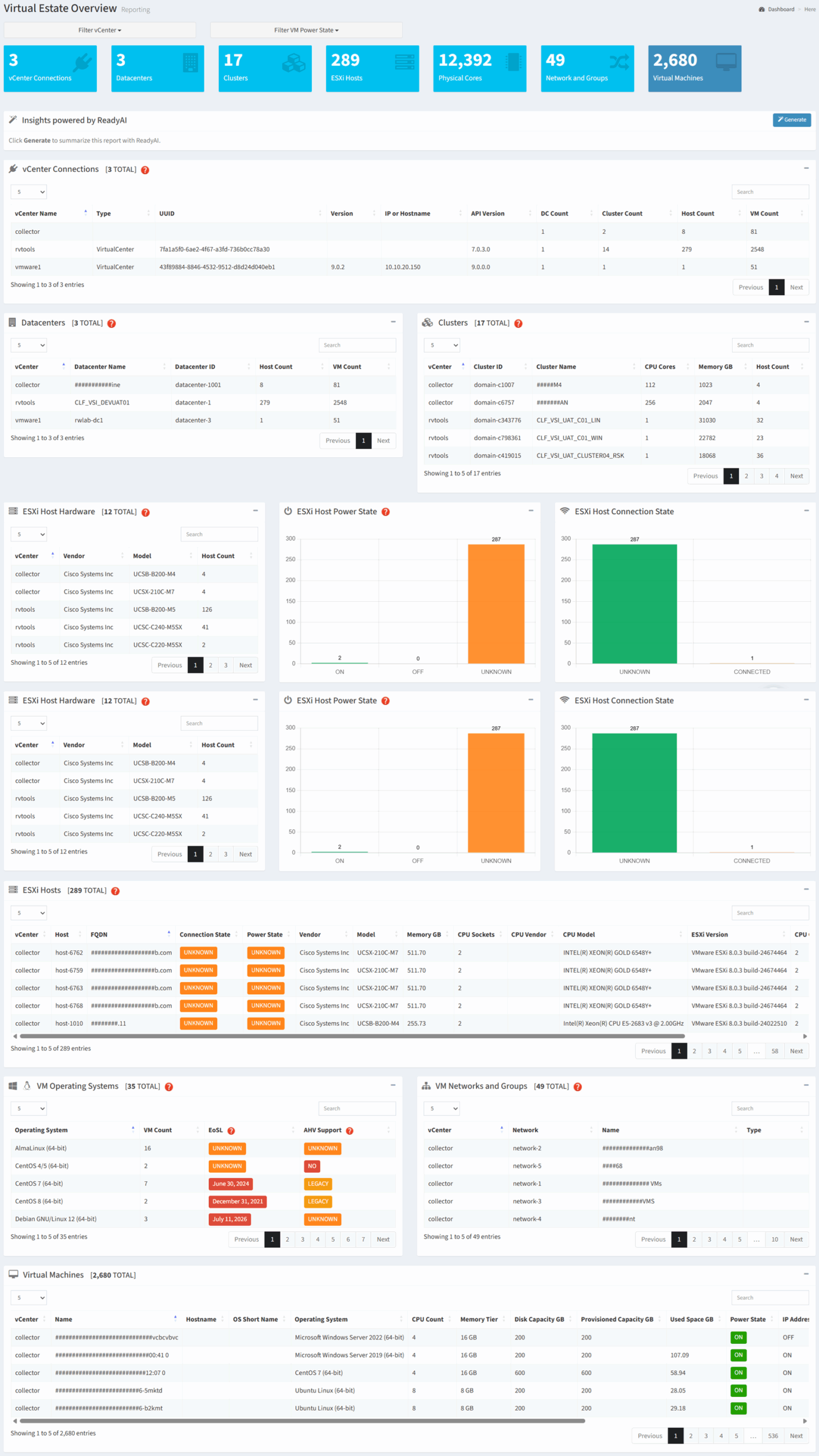
Available operations:
- View an overview of the virtual estate
- Filter the report by vCenter and VM Power State
- Generate an AI-powered summary of the report by clicking the Generate button
- View vCenter connection information
- View datacenter and cluster configurations
- View ESXi host inventory, hardware, power state, and connection status
- View guest operating system inventory and AHV compatibility
- View virtual machine network and port group information
- View detailed virtual machine inventory
Overview
The Virtual Estate Overview report provides a consolidated view of the structure, configuration, and health of your virtual environment. It answers three important planning questions:
- How is my virtual environment organized? (vCenters, datacenters, clusters, hosts, networks, and virtual machines)
- Are there infrastructure conditions that may affect migration? (host power state, connection status, operating system compatibility, and configuration differences)
- How should workloads be grouped and prepared for migration? (infrastructure boundaries, network placement, host relationships, and workload distribution)
The report consolidates infrastructure topology and configuration data into a single view, allowing you to identify dependencies, assess migration readiness, and understand how workloads are distributed across the virtual estate.
Key Benefits
- Understand the organization and scale of your virtual infrastructure
- Identify vCenter, datacenter, cluster, host, network, and virtual machine relationships
- Review ESXi host hardware, power state, and connection status
- Identify guest operating system compatibility with Nutanix AHV
- Evaluate infrastructure boundaries that may affect migration sequencing
- Generate AI-powered insights and recommendations
The following sections describe how the information presented in the Virtual Estate Overview report can be used to assess infrastructure readiness and support migration planning.
Infrastructure and Migration Planning
Use the information in this report to understand the topology and operational state of your virtual environment. This information helps identify infrastructure dependencies, determine how workloads should be grouped, and highlight configuration or compatibility issues that may require remediation before migration.
| Report Section | Key Information | Planning Value |
|---|
| vCenter Connections | vCenter inventory and connection details | Identify management boundaries and determine which vCenter environments are included in the migration scope. |
| Datacenters | Datacenter inventory and associated infrastructure | Understand logical infrastructure boundaries and workload distribution across datacenters. |
| Clusters | Cluster configuration, capacity, and membership | Identify workload groupings, resource pools, and cluster-level migration considerations. |
| ESXi Host Hardware | Host vendor, model, processor, memory, and hardware inventory | Assess the existing host footprint and identify hardware differences that may affect consolidation or migration planning. |
| ESXi Host Power State | Host power state distribution | Identify powered-off or unavailable hosts that may require investigation before migration. |
| ESXi Host Connection State | Host connection status | Identify disconnected or inaccessible hosts that may prevent complete inventory collection or workload migration. |
| ESXi Hosts | Detailed host inventory and configuration | Review host-level settings and determine whether infrastructure remediation is required before migration. |
| VM Operating Systems | Guest operating system inventory and AHV compatibility | Identify operating systems that may require upgrades, remediation, or alternate migration plans. |
| VM Networks and Groups | Virtual networks, port groups, and workload connectivity | Identify network dependencies and support target network design and migration wave planning. |
| Virtual Machines | Detailed virtual machine inventory | Understand workload distribution and support migration scoping, sequencing, and validation. |
Planning Metrics
| Resource | Used For |
|---|
| vCenter Connections | Identify management boundaries and migration scope |
| Datacenters | Understand logical infrastructure organization |
| Clusters | Identify workload groupings and resource boundaries |
| ESXi Hosts | Assess host inventory, configuration, and operational state |
| VM Operating Systems | Evaluate guest operating system compatibility and remediation requirements |
| Networks and Port Groups | Identify connectivity dependencies and target network requirements |
| Virtual Machines | Estimate migration scope, sequencing, and validation effort |
Typical Workflow
The following workflow provides a recommended approach for using the Virtual Estate Overview report during migration planning.
- Review the vCenter, datacenter, and cluster structure of the environment
- Assess ESXi host hardware, power state, and connection status
- Identify infrastructure boundaries and workload groupings
- Review guest operating system compatibility and potential remediation requirements
- Identify virtual machine network and port group dependencies
- Review detailed virtual machine inventory to support migration scoping and sequencing
- Generate an AI summary for planning and stakeholder discussions
This workflow represents a recommended starting point. Depending on your migration objectives, you may revisit individual sections of the report as your assessment progresses.