The Candidate Readiness & Selection report provides a detailed view of virtual machine readiness across your environment. Use this report to review migration readiness checks, identify workloads that require remediation, create migration groups, and add selected virtual machines to those groups for planning and execution.
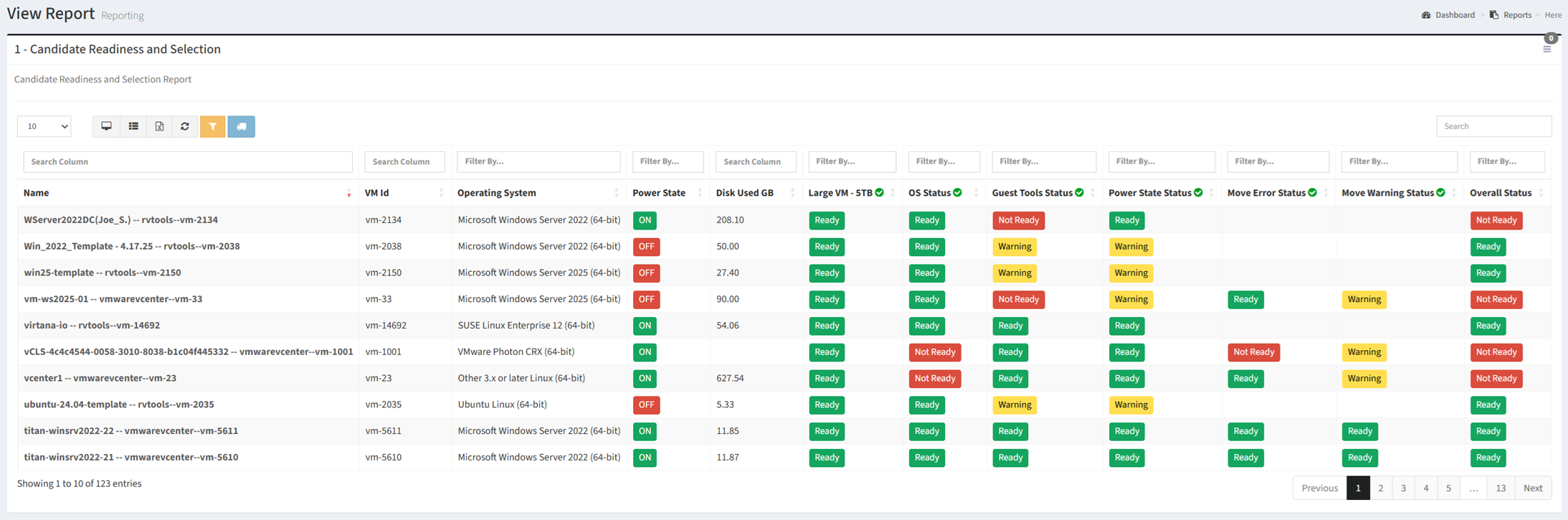
Available operations:
- View migration readiness results for virtual machines
- Filter and search readiness data by column
- Review individual readiness checks and overall readiness status
- Identify virtual machines with warnings, errors, or unmet migration requirements
- Add selected virtual machines to a new migration group
- Create custom readiness checks to evaluate organization-specific migration requirements
Overview
The Candidate Readiness & Selection report provides a consolidated view of the conditions that may affect whether a virtual machine can be migrated successfully. It answers three important planning questions:
- Which virtual machines are migration candidates? (Overall readiness and individual check results)
- Which candidates require remediation before migration? (Warnings, errors, unsupported conditions, and unmet requirements)
- Which candidates should be grouped into migration waves? (Migration groups and workload selection)
The report combines standard and custom readiness checks into a single view, allowing you to identify migration blockers, prioritize remediation, and organize qualified workloads into migration groups.
Key Benefits
- Assess migration candidate readiness across the virtual machine estate
- Review the result of each readiness check for every virtual machine
- Identify workloads that are ready, require attention, or are blocked
- Prioritize remediation based on warnings and failed checks
- Create custom readiness checks for organization-specific requirements
- Select migration candidates and add them directly to migration groups
The following sections describe how the information presented in the Candidate Readiness & Selection report can be used to assess migration readiness and prepare workloads for migration.
Candidate Readiness Assessment
Use the information in this report to evaluate each virtual machine against the readiness criteria required for migration. Standard checks provide a consistent assessment of common migration requirements, while custom checks allow you to include additional business, technical, or operational criteria.
| Readiness Area | Key Information | Planning Value |
|---|
| Power State | Current virtual machine power state | Identify workloads whose power state may require attention before migration. |
| Disk Usage | Storage currently used by the virtual machine | Estimate transfer volume and identify large workloads that may require additional migration time. |
| Large VM Check | Indicates whether the virtual machine exceeds the configured size threshold | Identify large workloads that may require special scheduling, bandwidth, or migration handling. |
| Operating System Status | Operating system readiness or support status | Identify guest operating systems that may require upgrades, validation, or remediation. |
| Guest Tools Status | Guest tools installation and operational status | Identify workloads that may require guest tools installation, updates, or remediation. |
| Power State Status | Readiness result based on the virtual machine power state | Determine whether the current power state meets migration requirements. |
| Move Error Status | Migration-tool errors associated with the virtual machine | Identify blocking errors that should be resolved before migration. |
| Move Warning Status | Migration-tool warnings associated with the virtual machine | Identify non-blocking conditions that should be reviewed before migration. |
| Custom Readiness Checks | Organization-defined readiness criteria | Evaluate additional business, application, security, or operational requirements. |
| Overall Status | Combined readiness result for the virtual machine | Quickly determine whether the workload is ready, requires attention, or is blocked. |
Readiness Indicators
| Metric | Used For |
|---|
| Overall Status | Identify virtual machines that are ready or require remediation |
| Warning Status | Identify non-blocking conditions that should be reviewed |
| Error Status | Identify migration blockers requiring resolution |
| Disk Used | Estimate transfer volume and migration duration |
| Power State | Confirm that workloads meet migration power-state requirements |
| Operating System Status | Evaluate operating system support and remediation requirements |
| Guest Tools Status | Identify workloads requiring guest tools remediation |
| Custom Checks | Evaluate organization-specific migration requirements |
Candidate Selection
Use the Candidate Readiness & Selection report to identify workloads that meet your migration criteria and organize them into migration groups. Selected virtual machines can be added to a new or existing migration group directly from the report toolbar.
- Select the virtual machines that should be grouped together
- Click the migration-group button on the toolbar
- Create a new migration group or select an existing group
- Add the selected virtual machines to the migration group
Group workloads according to factors such as application dependency, business function, migration readiness, maintenance window, network requirements, or target platform.
Custom Readiness Checks
Custom readiness checks allow you to extend the standard assessment with criteria that reflect your organization’s migration requirements. These checks can be used to evaluate business, application, security, operational, or technical conditions that are not included in the default readiness checks.
Use custom checks to identify conditions such as application-owner approval, backup completion, maintenance-window availability, dependency validation, or organization-specific configuration requirements.
Typical Workflow
The following workflow provides a recommended approach for using the Candidate Readiness & Selection report during migration planning.
- Review the readiness status of migration candidates
- Filter the report to identify workloads with warnings or errors
- Review individual readiness checks
- Resolve blocking issues and evaluate warnings
- Apply custom readiness checks, if applicable
- Select workloads that meet the required readiness criteria
- Create a migration group and add the selected candidates
- Reassess readiness as remediation work is completed
This workflow represents a recommended starting point. Revisit the report throughout migration planning to confirm that workloads remain ready and to organize newly qualified virtual machines into migration groups.