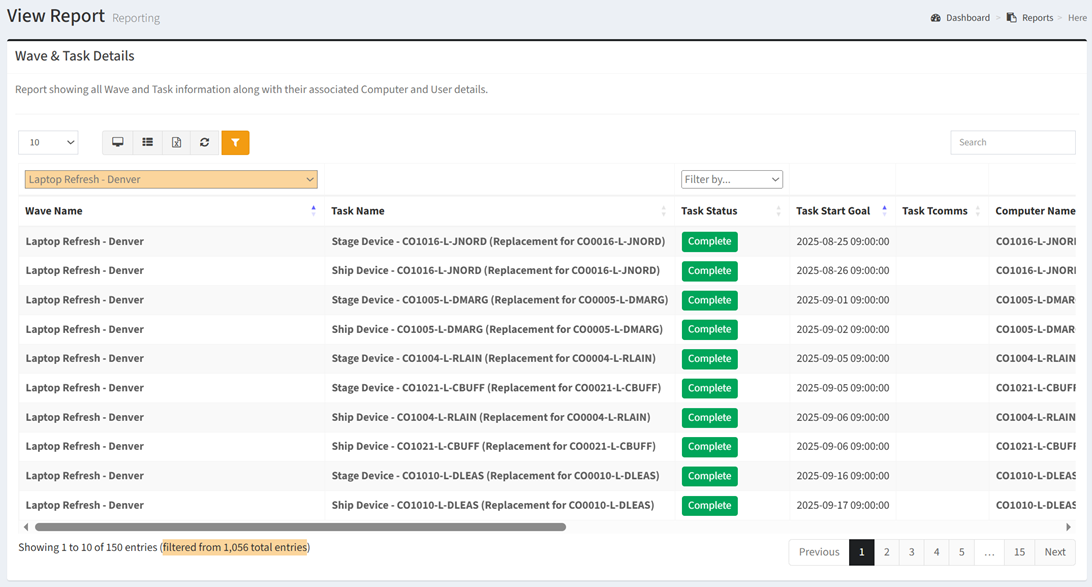
The Wave & Task Details report shows all Wave and Task information along with their associated Computer and User details.
| Data Types | Required Fields |
| Computer | Name, Migration Status, Type, Operating System, Serial |
| User | Name, Department, Location |
Available operations:
- View a list of all wave and task information along with their associated computer and user details
- Columns available
- Wave Name – Name of the wave
- Filter by wave names or Undefined (no wave)
- Task Name – Name of the task
- Task Status – Name of the task status (Not Started, In Progress, Overdue, Complete, Cancelled, Failed)
- Filter by Not Started, In Progress, Overdue, Complete, Cancelled or Failed
- Task Start Goal – Estimated start date and time of the task
- Task Tcomms – T-Comm templates assigned to the task
- Computer Name – Name of the computer
- Computer Migration Status – Name of the migration status
- Computer Type – Type of the computer (Laptop, Desktop, etc.)
- Filter by type or Undefined (no type)
- Computer Operating System – Operating system of the computer
- Computer Serial – Serial number of the computer
- Computer Data Type Specific Columns – Columns specific to the computer data type
- User Name – Name of the user
- User Department – Name of the department
- Filter by department names or Undefined (no department)
- User Location – Name of the location
- Filter by location names or Undefined (no location)
- User Data Type Specific Columns – Columns specific to the user data type Columns available
- You can also change the number of visible rows in the table, view full screen, export to CSV or Excel, refresh the table, and search for text