The Inbound Jobs tab provides the ability to manage inbound connection jobs.
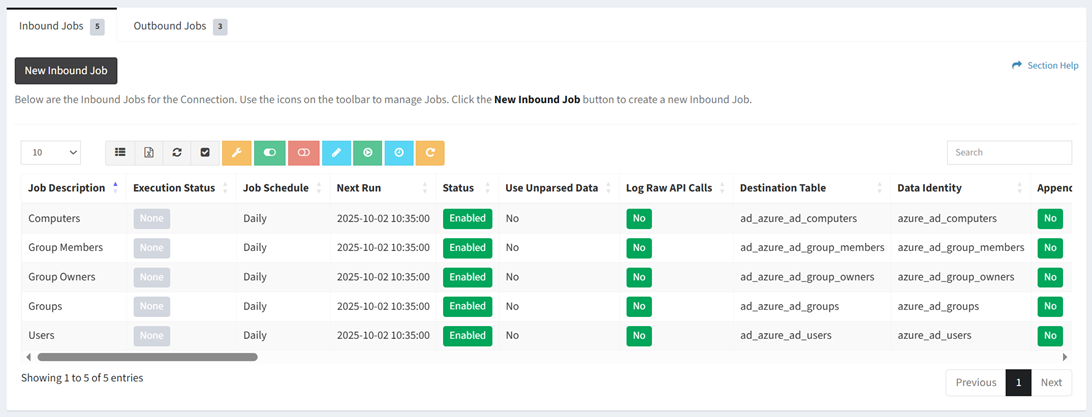
Available operations:
- Create new inbound jobs by clicking on the New Inbound Job button
- View the inbound jobs associated with the connection
- Columns available (available job fields differ by connector)
- Id (hidden by default) – System Id of the job
- Job Description – Description of the job
- Execution Status – Status of the execution (None, Success, Error)
- Job Schedule – Frequency the job will run (Weekly, Daily, Hourly, Custom)
- Next Run – Date the job will next run
- Status – Whether the job is enabled or disabled
- Use Unparsed Data – Whether incoming data is parsed or left in its raw format
- Log Raw API Calls – Whether raw API calls are logged
- Allow Empty Table (hidden by default) – Whether an empty table is allowed (Yes, No)
- Destination Table – Name of the destination table (e.g., my_table_cm_computer)
- Data Identity – Identity of the data for dashboards (e.g., cm_computer)
- XML Envelope Payload – XML envelope payload of the SOAP call
- Data Selection (hidden by default) – Connector specific data selection command of the job
- CSV/JSON/XML File or Path (hidden by default) – CSV/JSON/XML file or path
- Append Files to Same Destination Table – Choose if multiple files in the same path will append to the same destination table, or will create a new destination table for each file
- Append New Data to Existing Tables – Choose if new data will append to the same destination table, or will create a new destination table
- Fields to Index (hidden by default) – Fields to index
- Request Unique Key Field – Request unique key field of the job
- Request Sort By Field (hidden by default) – Field to sort the job by (databases only)
- Request Limit – Request limit of the job
- Method Type – Method type of the job (GET, POST, PUT, PATCH, DELETE)
- API End Point – API end point of the job
- API Data Parameters (hidden by default) – API data parameters of the job
- Body Data Sending Method – Method for sending the body data of the job (JSON Encoded Data, Form Data)
- Raw JSON Body Data – Raw JSON body to send. Do not use body selections in the API Parameters if this is used.
- API Return Data Node – API return data node of the job
- Ignore XML Attributes – Whether field attributes are ignored and not included in the data when parsing XML
- Pagination Type – Paging type of the job (Records, Pages, Next Record Node, Next Page Node)
- API Pagination Node – API pagination node of the job (Next Page, Next Node)
- Pagination Offset Start – Request paging offset start or data node of the job
- Pagination Limit – Request pagination limit of the job
- Pagination Termination Node – Pagination termination node of the job
- Maximum API Calls – Limit of API calls that can be made by the job to avoid an endless loop
- Enumeration 1 Type – Enumeration type of the job (API End Point, Other ETL Job, Data Type, External Data)
- Enumeration ETL Job – ETL job for the enumeration values of the job
- Enumeration 1 Data Type – Data type and fields of the enumeration values
- Enumeration 1 Keys End Point (hidden by default) – Enumeration keys end point of the job
- Enumeration 1 Node – Enumeration node of the job
- Enumeration 1 Fields (hidden by default) – Enumeration fields of the job
- Enumeration 2 Type – Enumeration type of the job (API End Point, Other ETL Job, Data Type)
- Enumeration 2 ETL Job – ETL job for the enumeration values of the job
- Enumeration 2 Data Type – Data type and fields of the enumeration values
- Enumeration 2 Keys End Point (hidden by default) – Enumeration keys end point of the job
- Enumeration 2 Node – Enumeration node of the job
- Enumeration 2 Fields (hidden by default) – Enumeration fields of the job
- Enumeration 3 Type – Enumeration type of the job (API End Point, Other ETL Job, Data Type)
- Enumeration 3 ETL Job – ETL job for the enumeration values of the job
- Enumeration 3 Data Type – Data type and fields of the enumeration values
- Enumeration 3 Keys End Point (hidden by default)
- Enumeration 3 Node – Enumeration node of the job
- Enumeration 3 Fields (hidden by default) – Enumeration fields of the job
- Pause Enumeration – Pause enumeration every X calls for Y seconds
- Kill Enumeration on Error – Choose if enumeration is stopped on an error
- Additional Fields (hidden by default) – Additional fields to add to the staging data when the jobs run
- Retry Pause – Retry API connection every X times, pausing Y seconds between each API try, with and API timeout of Z seconds (Retries,Pause,Timeout)
- Order – Order the job should run
- Connection Id (hidden by default) – System Id of the connection
- Job Schedule Id (hidden by default) – System Id of the job schedule
- Override Settings – Error settings that have been overridden
- Select and deselect all inbound jobs (rows) on the page by clicking the Select All or Deselect All buttons on the toolbar
- Override connection error settings by selecting a job (row) and clicking the Job Error Settings button on the toolbar
- Enable inbound jobs by selecting one or more jobs (rows) and clicking the Enable Job button on the toolbar
- Disable inbound jobs by selecting one or more jobs (rows) and clicking the Disable Job button on the toolbar
- Edit inbound jobs by selecting a job (row) and clicking the Edit Job button on the toolbar
- Upload inbound job files by selecting a job (row) and clicking the Upload File button on the toolbar
NOTE: The upload function is only available for connections with Manual File Upload. - Run inbound jobs by selecting a job (row) and clicking the Run Inbound Job button on the toolbar
- Set runtime on inbound jobs to now by selecting one or more jobs (rows) and clicking the Set Runtime to Now button on toolbar
- Reset inbound jobs by selecting one or more jobs (rows) and clicking the Reset Job button on the toolbar
- Delete inbound jobs by selecting a job (row) and clicking the Delete Job button on the toolbar
- View the job log of a job by selecting a job (row) and scrolling to the bottom of the page
- You can also change the number of visible rows in the table, set column visibility, export to CSV or Excel, refresh the table, and search for text