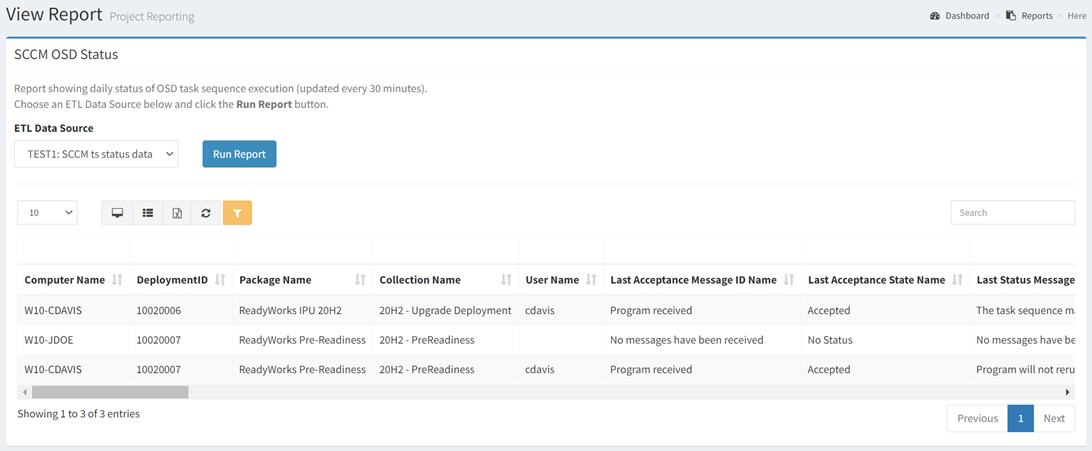
The SCCM OSD Status report (ETL4 only) shows daily status of OSD task sequence execution (updated every 30 minutes).
| Data Types | Required Fields |
| Computer | None |
| User | None |
Available operations:
- View the daily status of OSD task sequence execution
- Columns available
- Computer Name – Name of the computer
- DeploymentID – SCCM ID of the deployment
- Package Name – Name of the package being deployed
- Collection Name – Name of the SCCM collection
- User Name – Name of the user linked to the computer
- Last Acceptance Message ID Name – Name of the last acceptance message ID (e.g. Program received)
- Last Acceptance State Name – Name of the last acceptance state (e.g. Accepted)
- Last Status Message ID Name – Name of the last status message ID (e.g. The task sequence successfully completed execution of the task sequence)
- Last State Name – Name of the last state (e.g. Succeeded, Failed)
- Last Status Time – Time of the last status
- Last Execution Result – Result of the last execution
- Last TS Step – Last task sequence step executed
- Last Action Name – Name of the last action (e.g. Install Updates, Upgrade Operating System)
- Last Group Name – Name of the last group (e.g. Rollback, Upgrade the Operating System)
- Last Action Output – Output of the last action
- You can also change the number of visible rows in the table, view full screen, export to CSV or Excel, refresh the table, and search for text