The Rules tab provides the ability to enable access to Rules in the Orchestration module.

Available operations:
View
From the Rules tab, you can enable View access for rules.

Available operations with Rules View access:
Create
From the Rules tab, you can enable Create access for rules.

Available operations with Rules Create access:
Update
From the Rules tab, you can enable Update access for rules.

Available operations with Rules Update access:
- Edit the properties of rules
Delete
From the Rules tab, you can enable Delete access for rules.

Available operations with Rules Delete access (requires View):
Export
From the Rules tab, you can enable Export access for rules.

Available operations with Rules Export access (requires View):
Select All
From the Rules tab, you can select all or deselect all permissions for rules.
- From the
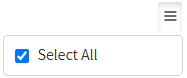
 menu in the upper right corner, check Select All to check (enable) all permissions on the tab.
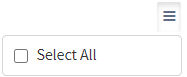
- Uncheck Select All to uncheck (remove) all permissions on the tab.
Ignore
From the Rules tab, you can ignore rules permissions from this security group by selecting Ignore. This option is used when overlaying multiple security groups and rules permissions are set by a different security group. Not enabling permissions on the Rules tab, without selecting Ignore, results in no access, as overlaid security groups assume the most restrictive permissions.
