The Strategizer page provides the ability to manage VirtualReady strategies. The Strategizer is a planning and analysis workspace that helps organizations build and evaluate migration strategies before execution. It brings together discovered infrastructure, allows users to organize VMs into migration strategies, and provides AI-assisted recommendations, capacity analysis, phasing, and cost insights.
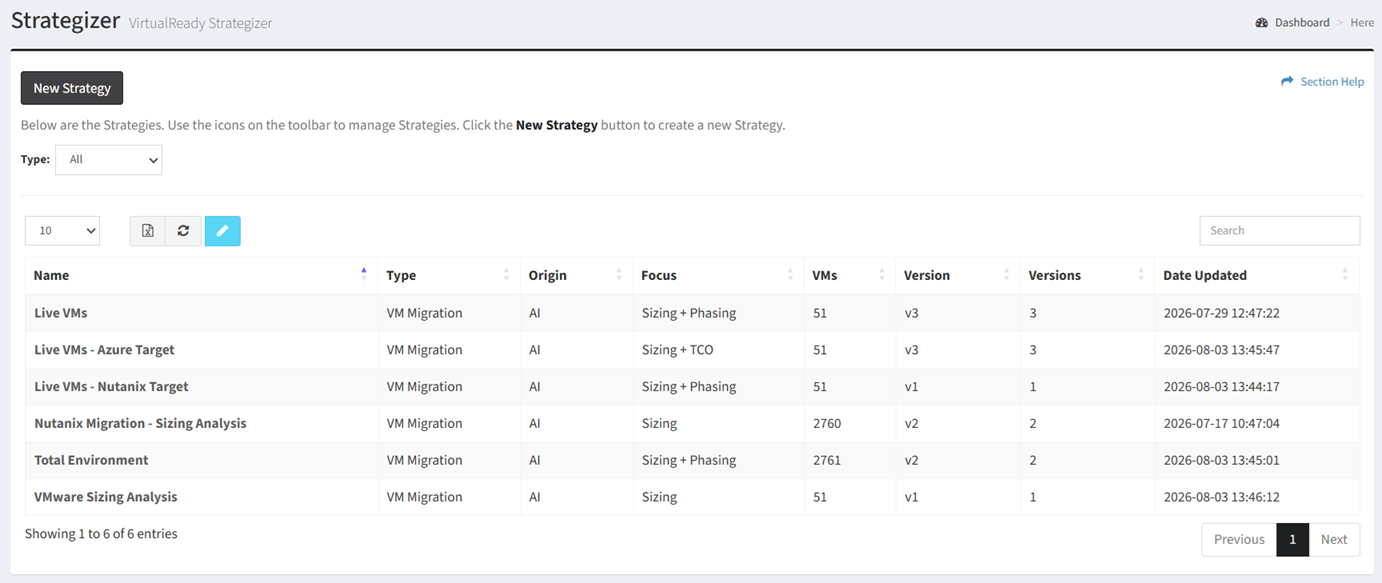
Available operations:
- Create new strategies by clicking on the New Strategy button
- View a list of strategies in ReadyWorks
- Columns available
- Name – Name of the strategy
- Type – Type of the strategy (VM Migration)
NOTE: VMware is the only migration source currently supported. - Origin – Origin of the strategy (AI)
- Focus – Areas of focus of the strategy
- Sizing – Capacity footprint
- Phasing – Migration planning and wave sequencing
- TCO – Target cost analysis
- VMs – Total number of VMs added to the strategy
- Version – Version of the strategy
- Versions – Total number of saved versions of the strategy
- Date Updated – Date the strategy was updated
- View the properties of strategies by clicking the hyperlink of the Name field
- Edit strategies by selecting a strategy (row) and clicking the Edit Strategy button on the toolbar
- Delete strategies by selecting a strategy (row) and clicking the Delete Strategy button on the toolbar
- You can also change the number of visible rows in the table, export to CSV or Excel, refresh the table, and search for text