The ETL enables you to connect to and aggregate data from multiple external sources into a unified view within ReadyWorks, where you can seamlessly orchestrate outbound actions, such as triggering workflows, updating records in target systems, sending notifications, or executing API calls, based on specific data conditions or business rules. The following sections detail the functionality of the ETL.
ETL Features
| Connections | View and activate connections to your data sources |
| Connection Jobs | View and manage jobs for all active connections |
| Job History | View the job history of all inbound and outbound jobs |
| Staging Data | View staging data in the ETL |
| Connection Settings | View and configure ETL connection settings |
| ETL Settings | View and configure ETL error and system settings |
| ETL Job Schedules | Manage ETL job schedules |
| Connector Library | View and configure connectors to your data sources |
ETL Diagram
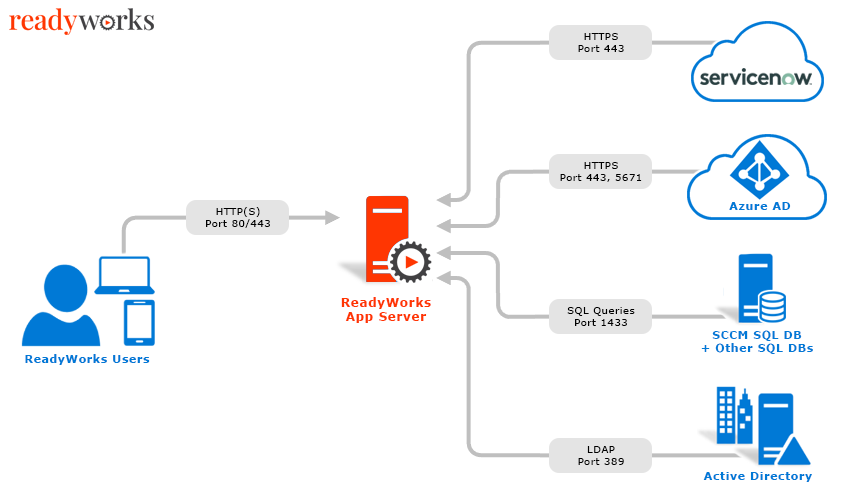
The ReadyWorks ETL interfaces with various on-premises and hosted systems in your environment. A list of some of the latest connectors available in ReadyWorks is outlined here. Below is a high-level diagram of a typical ReadyWorks implementation and the associated data flows.