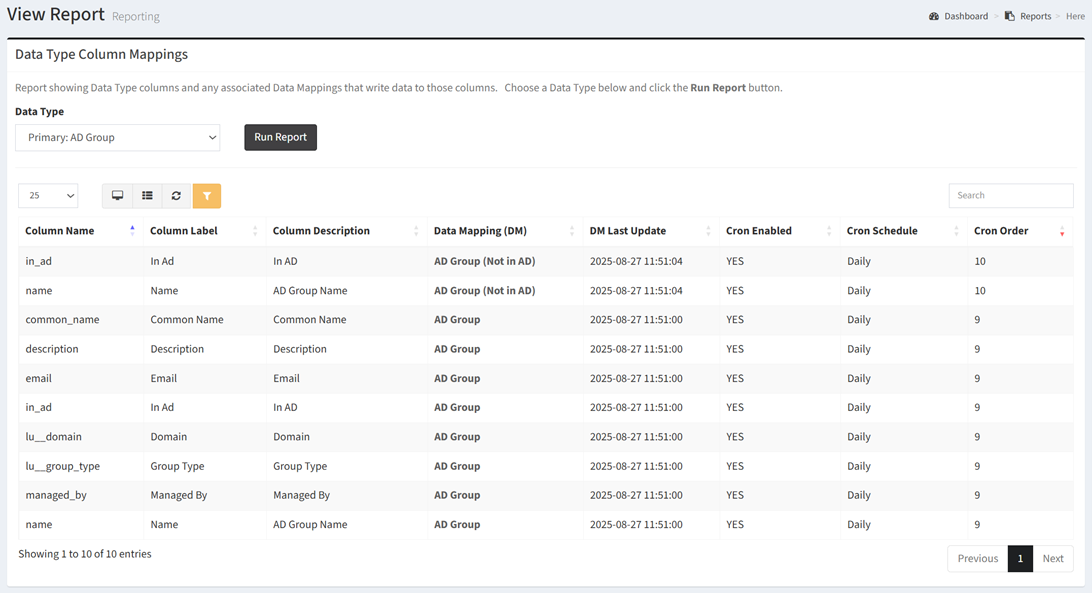
The Data Type Column Mappings report shows Data Type columns and any associated Data Mappings that write data to those columns.
| Data Types | Required Fields |
| Any | None |
Available operations:
- To run the report, choose a data type (e.g., Computer, User, etc.) from the Data Type drop down and click the Run Report button.
- View a list of data type columns and their associated data mappings
- Columns available
- Column Name – Name of the column
- Column Label – Label of the column
- Column Description – Description of the column
- Data Mapping (DM) – Name of the data mapping for the column
- DM Last Update – Date and time when the data mapping last updated the column
- Cron Enabled – Whether the data mapping cron job is enabled or not
- Cron Schedule – Frequency the the data mapping cron job will run
- Cron Order – Prder the data mapping cron job will run at the designated frequency
- You can also change the number of visible rows in the table, view full screen, export to CSV or Excel, refresh the table, and search for text