From the Connections page, you can create connections. To create:
- Click the New Connection button to bring up the New Connection dialog
- Enter the properties of the new connection
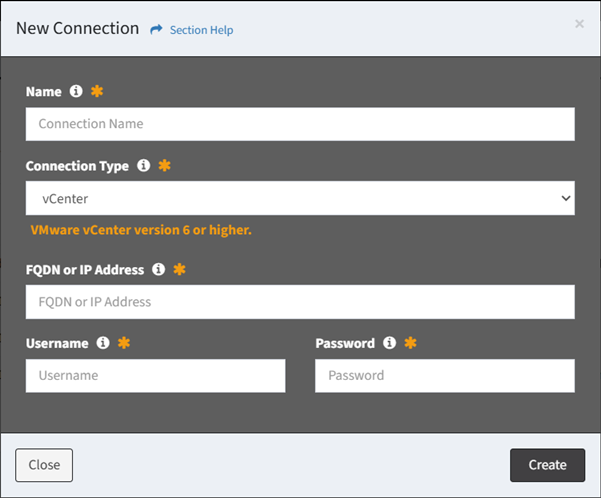
- Name – Name of the connection (required)
- Connection Type – Type of the connection
- Live
- vCenter – VMware vCenter version 6 or higher
- Nutanix Prism – Prism Central version pc2024.3 or later (recommended) OR AOS version 6.8 or later without Prism Central
- Nutanix Prism Legacy – Prism Central versions before pc2024.3 OR AOS versions before 6.8 without Prism Central
- Nutanix Move – Nutanix Move version 5.3 or greater
- File-Based
- RVTools – VMware inventory data from an RVTools export (.xlsx or .csv)
- Nutanix Collector – VMware inventory data from a Nutanix Collector export (.xlsx or .csv)
- FQDN or IP Address – Fully qualified domain name or IP address of the VMware/Nutanix management consoles
- Username – User account used to connect to the VMware/Nutanix management consoles
- Password – Password of the user account used to connect to the VMware/Nutanix management consoles
- Click the Create button when finished to create the connection. You will be redirected back to the Connections page. Click the Close button to cancel the operation.