The Outbound Jobs tab provides the ability to manage outbound connection jobs.
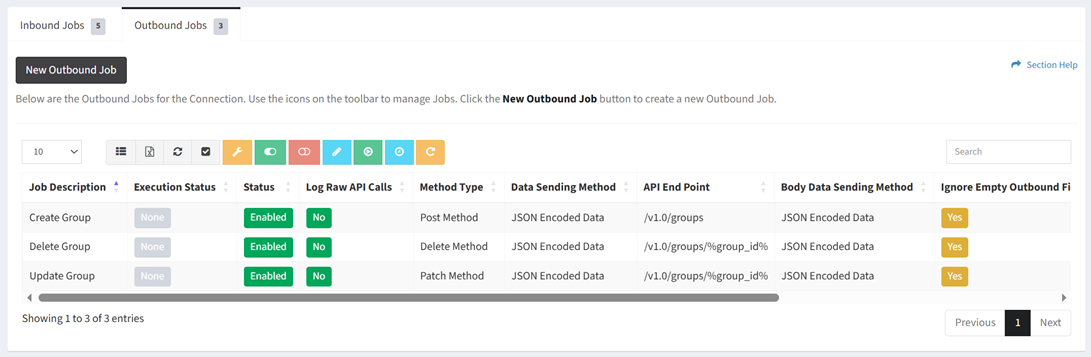
Available operations:
- Create new outbound jobs by clicking on the New Outbound Job button
- View the outbound jobs associated with the connection
- Columns available (available job fields differ by connector)
- Id (hidden by default) – System Id of the job
- Job Description – Description of the job
- Execution Status – Status of the execution (None, Success, Error)
- Status – Whether the job is enabled or disabled
- Log Raw API Calls – Choose if raw API calls are logged
- Method Type – Method type of the job (GET, POST, PUT, PATCH, DELETE)
- Data Sending Method – Data sending method of the job (JSON Encoded Data, Form Data)
- API End Point – API end point of the job
- API Data Parameters (hidden by default) – API data parameters of the job
- Body Data Sending Method – Method for sending the body data of the job (JSON Encoded Data, Form Data)
- Return Data Fields List (hidden by default) – Return data fields of the job
- Outbound Fields List (hidden by default) – Outbound fields of the job
- Ignore Empty Outbound Fields – Whether empty outbound fields are ignored
- Raw JSON Outbound Template – JSON outbound template to send. This replaces any automated structures defined in the outbound fields.
- Order – Order of the job in the Activate New Connection dialog
- Override Settings – Job settings that have been overridden
- Connection Id (hidden by default) – System Id of the connection
- Select and deselect all outbound jobs (rows) on the page by clicking the Select All or Deselect All buttons on the toolbar
- Override connection error settings by selecting a job (row) and clicking the Job Error Settings button on the toolbar
- Enable outbound jobs by selecting one or more jobs (rows) and clicking the Enable Job button on the toolbar
- Disable outbound jobs by selecting one or more jobs (rows) and clicking the Disable Job button on the toolbar
- Edit outbound jobs by selecting a job (row) and clicking the Edit Job button on the toolbar
- Run outbound jobs by selecting a job (row) and clicking the Run Outbound Job button on the toolbar
- Set runtime on outbound jobs to now by selecting one or more jobs (rows) and clicking the Set Runtime to Now button on toolbar
- Reset outbound jobs by selecting one or more jobs (rows) and clicking the Reset Job button on the toolbar
- Delete outbound jobs by selecting a job (row) and clicking the Delete Job button on the toolbar
- View the job log of a job by selecting a job (row) and scrolling to the bottom of the page
- You can also change the number of visible rows in the table, set column visibility, export to CSV or Excel, refresh the table, and search for text