From the Authentication Methods tab, you can create authentication methods. To create:
- Click the New Authentication Method button to bring up the New Authentication Method dialog
- Enter the properties of the new authentication method
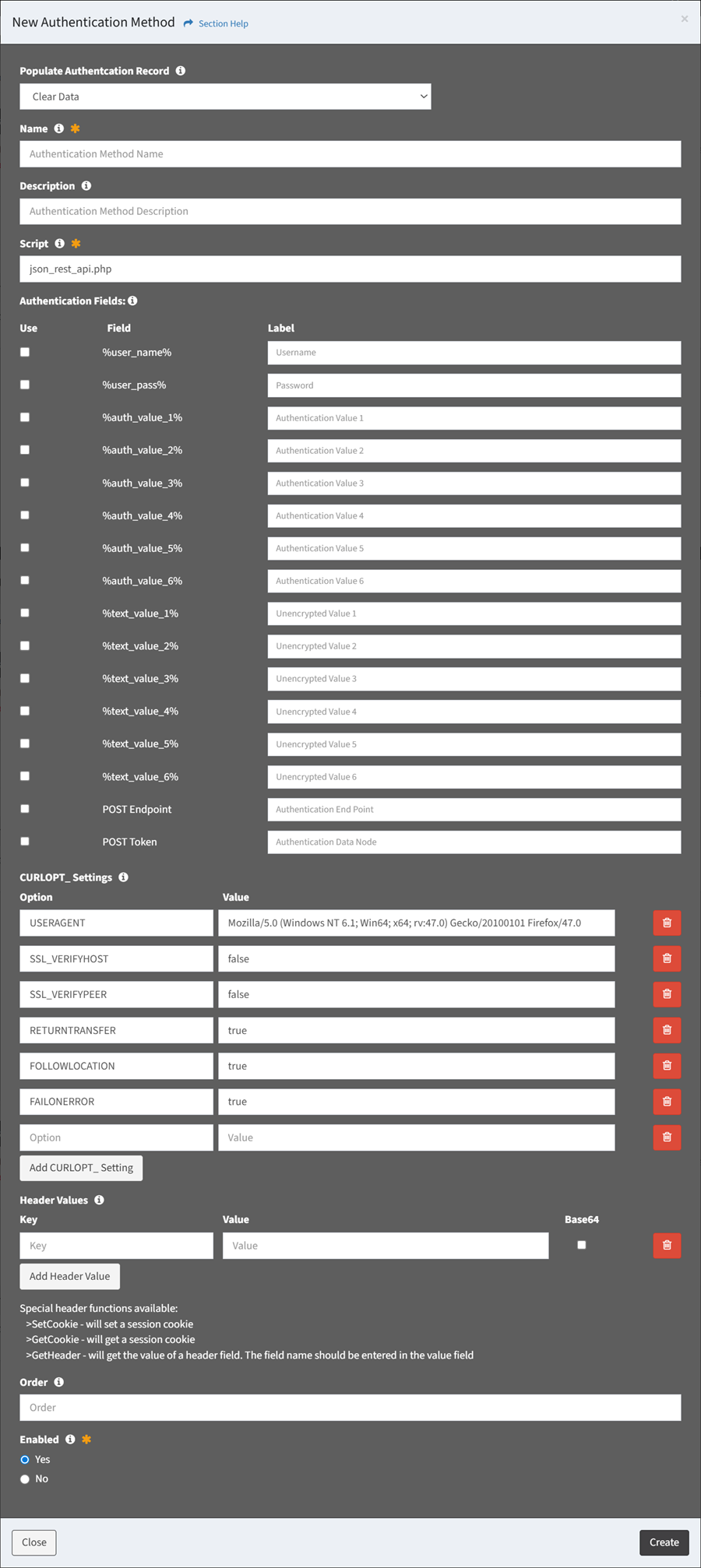
- Populate Authentication Record – Choose how to populate the authentication method (required)
- Clear Data – Start with an empty record
- Clone Authentication Method – Start with a clone from an existing authentication method
- Name – Name of the authentication method (required)
- Description – Description of the authentication method (optional)
- Script – Name of the authentication script (required)
- json_rest_api.php
- Authentication Fields – Authentication fields of the authentication method (optional)
- CURLOPT Settings – CURLOPT settings of the authentication method (optional)
- Header Values – API header values of the authentication method (optional)
- Data Values – API data values of the authentication method (optional)
NOTE: These settings are only visible when POST Endpoint has been checked. - Post Authorization CURLOPT Settings – Post authorization PHP CURLOPT settings of the authentication method (optional)
NOTE: These settings are only visible when POST Endpoint has been checked. - Post Authorization Header Values – API post authorization header values of the authentication method (optional)
NOTE: These settings are only visible when POST Endpoint has been checked.
- Order – Order of the authentication method in the menu (optional)
- Enabled – Choose if the authentication method is enabled (required)
- Click the Create button when finished to create the authentication method. You will be redirected back to the Authentication Methods tab. Click the Close button to cancel the operation.
- The new authentication method function is only available to users in the Administrator security group