The Reports page provides the ability to view ReadyWorks reports to glean insights from your data. ReadyWorks includes many reports out-of-the-box and a report builder to generate your own reports.
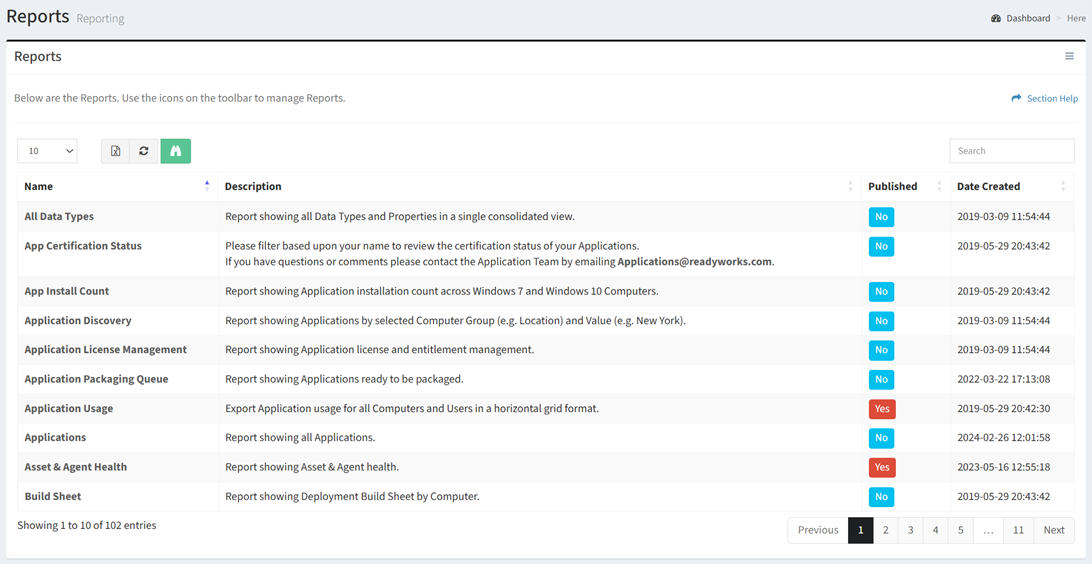
Available operations:
- View a list of ReadyWorks reports
- Columns available
- Name – Name of the report
- Description – Description of the report
- Published – Whether the report is published or not
- Date Created – Date the report was created
- View a report by clicking the hyperlink of the Name field
- View published reports (ReadyWorks reports that can be accessed by non-ReadyWorks users using a report URL without having to log in to ReadyWorks) by selecting a published report (row) and clicking the View Published Report button on the toolbar
- Remove report views by clicking the refresh button
- You can also change the number of visible rows in the table, export to CSV or Excel, refresh the table, and search for text
NOTE: ReadyWorks Administrators can install reports, generate reports, edit reports, and publish reports on the Reports Configuration page. Contact ReadyWorks Support to create or modify custom reports. A detailed description of some of the custom reports available in ReadyWorks is outlined in Available Reports.
In this section