The Migrations page provides the ability to manage VirtualReady migrations.
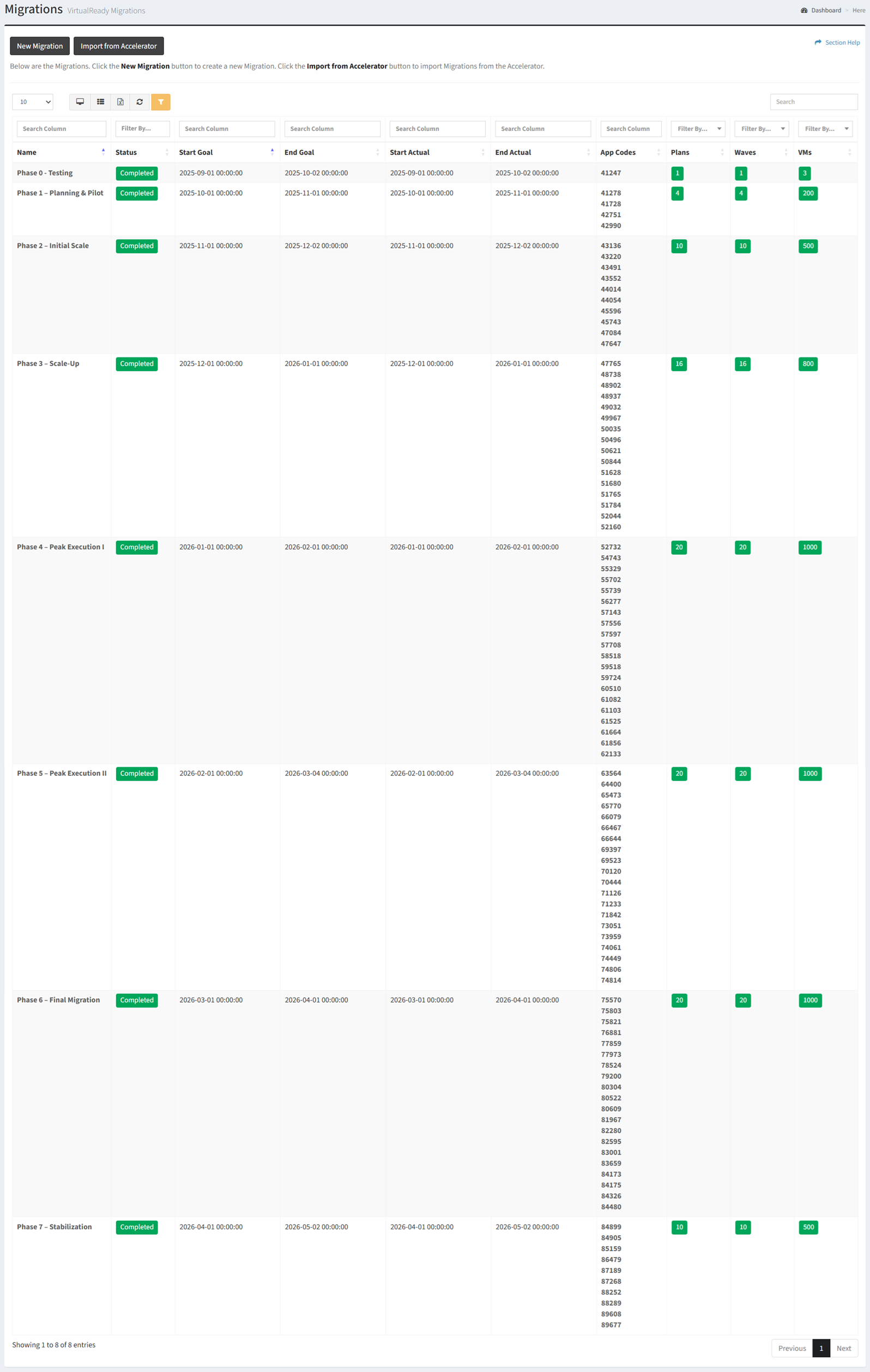
Available operations:
- Create new migrations by clicking on the New Migration button
- View a list of migrations in ReadyWorks
- Columns available
- Id (hidden by default) – System Id of the migration
- Name – Name of the migration
- Description (hidden by default) – Description of the migration
- Status – Status of the migration (Not Started, In Progress, Completed, Cancelled, Blocked, On Hold)
- Start Goal – Estimated start date and time of the migration
- End Goal – Estimated end date and time of the migration
- Start Actual – Actual start date and time of the migration (empty until a migration plan has been started or completed)
- End Actual – Actual end date and time of the migration (empty until all migration plans have been completed)
- App Codes – Names of the app codes of the applications to which the VMs are linked
- Plans – Total number of migration plans linked to the migration
- Waves – Total number of waves linked to the migration
- VMs – Total number of VMs linked to the migration
- View the properties of migrations by clicking the hyperlink of the Name field
- Delete migrations by selecting a migration (row) and clicking the Delete Migration button on the toolbar
- You can also change the number of visible rows in the table, view full screen, set column visibility, export to CSV or Excel, refresh the table, and search for text
In this section