The Inbound Jobs tab provides the ability to manage inbound connection jobs.
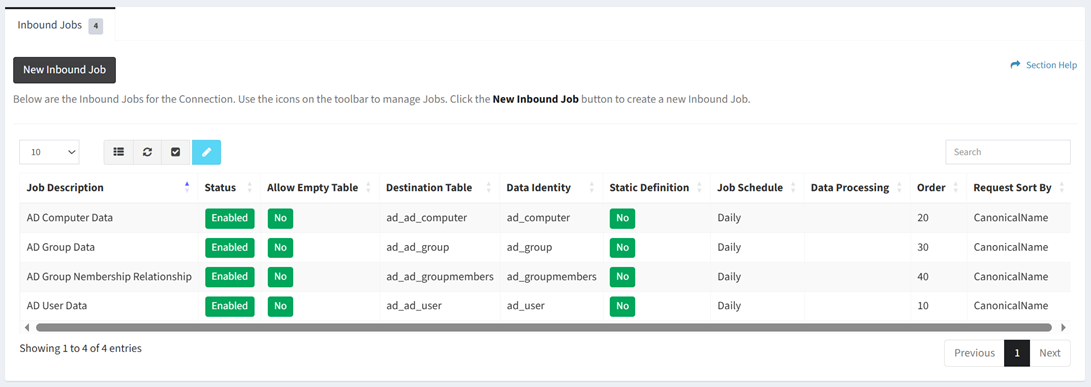
Available operations:
- Create new inbound jobs by clicking on the New Inbound Job button
- View the inbound jobs associated with the connection
- Columns available (available job fields differ by connector)
- Id (hidden by default) – System Id of the job
- Job Description – Description of the job
- Status – Whether the job is enabled or disabled
- Allow Empty Table – Whether an empty table is allowed (Yes, No)
- Destination Table – Name of the destination table (e.g., my_table_cm_computer)
- Data Identity – Identity of the data for dashboards (e.g., cm_computer)
- Static Definition – Choose if the table definition is static
- Job Schedule – Frequency the job will run (Weekly, Daily, Hourly, Custom)
- Data Processing – Processing of the data
- Future field to be used for running a process against data
- Order – Order the job should run
- Fields to Index (hidden by default) – Fields to index
- Data Selection (hidden by default) – Connector specific data selection command of the job
- Data Selection URL (hidden by default) – Data selection URL of the job
- Request Filter (hidden by default) – Fields to filter from the job (AD only)
- Request Sort By – Field to sort the job by
- Request Limit – Request limit of the job (Druva, ServiceNow and CrashPlan only)
- Request Fields (hidden by default) – Fields requested by the job (ServiceNow only)
- Connection Id (hidden by default) – System Id of the connection
- Select and deselect all inbound jobs (rows) on the page by clicking the Select All or Deselect All buttons on the toolbar
- Edit inbound jobs by selecting a job (row) and clicking the Edit Job button on the toolbar
- Delete inbound jobs by selecting a job (row) and clicking the Delete Job button on the toolbar
- You can also change the number of visible rows in the table, set column visibility, refresh the table, and search for text