The Wave Exceptions tab provides the ability to exclude blackout periods, holidays, and change freezes from the User Experience Schedule.
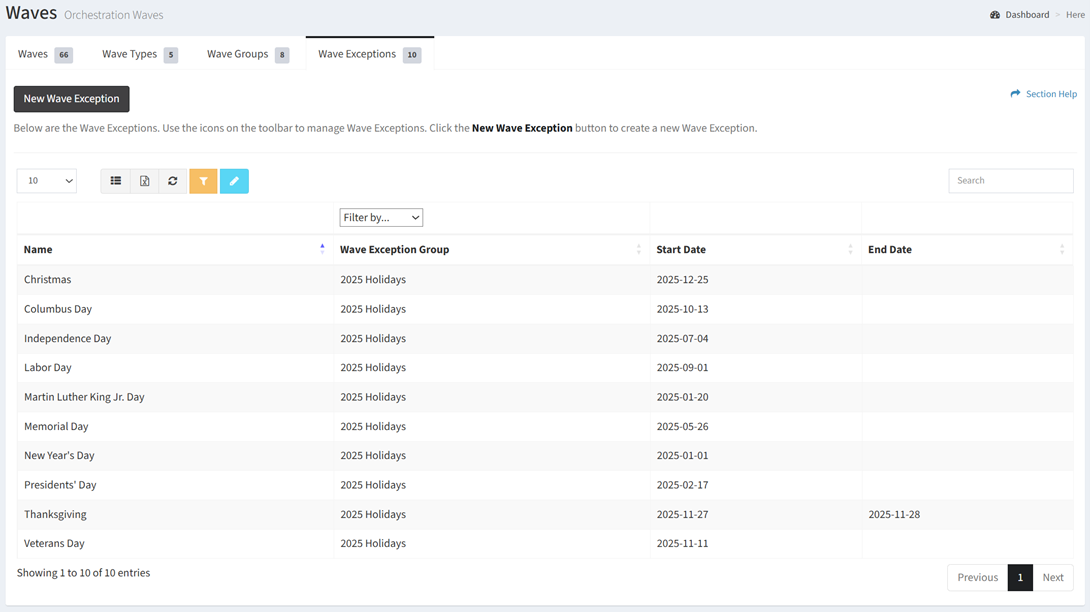
Available operations:
- Create new wave exceptions by clicking on the New Wave Exception button
- View a list of wave exception in ReadyWorks
- Columns available
- Name – Name of the wave exception
- Wave Exception Group – Name of the wave exception group to which the wave exception is assigned
- Filter by wave exception group names
- Start Date – Start date of the wave exception
- End Date – End date of the wave exception (blank if the wave exception is a single day)
- Edit wave exceptions by selecting a wave exceptions (row) and clicking the Edit Wave Exception button on the toolbar
- Delete wave exceptions by selecting a wave exceptions (row) and clicking the Delete Wave Exception button on the toolbar
- You can also change the number of visible rows in the table, set column visibility, export to CSV or Excel, refresh the table, and search for text
In this section