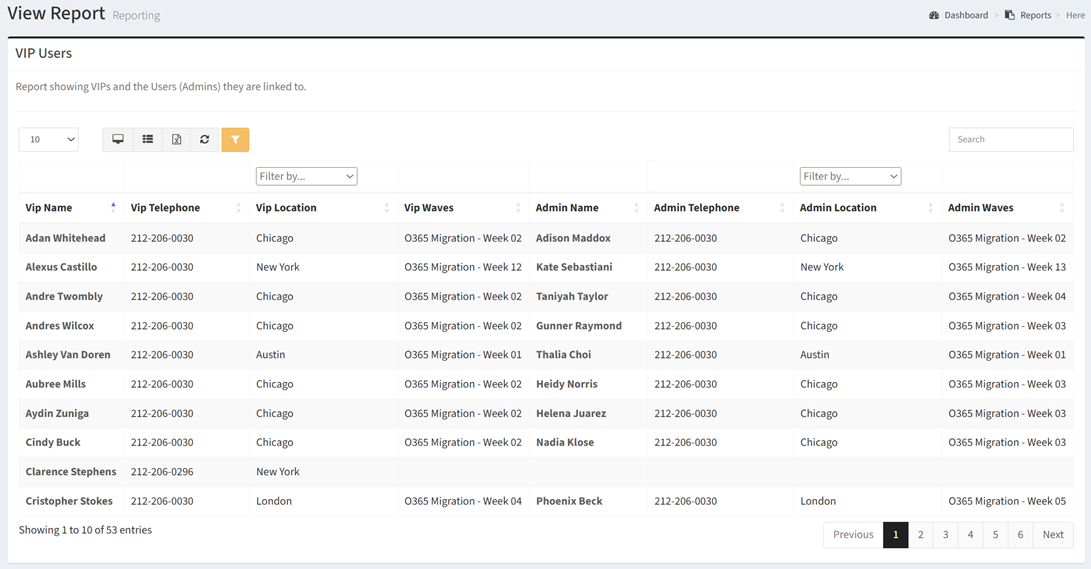
The VIP Users report shows VIPs and the Users (Admins) they are linked to.
| Data Types | Required Data Columns |
| User | VIP Name, Title, Telephone, Location, Linked Admin Name, Telephone, Location |
Available operations:
- View a list of VIP users and their linked Admin users
- Columns available
- VIP Name – Name of the VIP user
- VIP Title – Title of the VIP user
- VIP Telephone – Telephone number of the VIP user
- VIP Location – Location of the VIP user
- VIP Waves – Waves the VIP user is assigned to
- Admin Name – Name of the Admin user
- Admin Telephone – Telephone number of the Admin user
- Admin Location – Location of the Admin user
- VIP Waves – Waves the VIP user is assigned to
- You can also change the number of visible rows in the table, view full screen, export to CSV or Excel, refresh the table, and search for text
NOTE: The VIP and Admin user records must be linked to show a relationship on this report.