

Search Knowledge Base by Keyword
-
Introduction
-
Fundamentals
-
My ReadyWorks
-
Analytics
-
-
-
- Available Reports
- All Data Types
- Application Certification Status
- Application Discovery
- Application Group Analysis
- App Group to SCCM Collection Analysis
- Application Install Count
- Application License Management
- Application Usage
- Assets by Values
- Build Sheet
- Computer User Assignment
- Data Type Column Mappings
- Delegate Relationships
- ETL5 Staging Data
- Migration Readiness (Basic)
- Migration Readiness (Complex)
- O365 License Management
- O365 Migration Readiness
- Patch Summary
- Record Count by Property
- SCCM OSD Status
- Scheduled Computers by Wave
- Scheduled Users by Manager
- User Migration Readiness
- VIP Users
- Wave & Task Details
- Wave Group
- Windows 10 Applications
- Show all articles ( 14 ) Collapse Articles
-
-
-
-
Orchestration
-
Data
-
-
- View Primary Data
- Record Properties
- Images
- Notes
- Waves
- Tasks
- Attachments
- History
- Rationalization
- QR Code
- Linked Records
- SCCM Add/Remove Programs
- Altiris Add/Remove Programs
- Related Records
- Advanced Search
- Relationship Chart
- Primary Data Permissions
- Show all articles ( 2 ) Collapse Articles
-
Integration
-
-
-
- View Connection
- Connection Properties
- Make Into Connector
- Delete Connection
- Connection Error Settings
- Inbound Jobs
- Outbound Jobs
- New Inbound Job
- New Outbound Job
- Job Error Settings
- Enable Job
- Disable Job
- Edit Inbound Job
- Edit Outbound Job
- Upload File
- Run Inbound Job
- Run Outbound Job
- Set Runtime to Now
- Reset Job
- Delete Job
- Job Log
- Show all articles ( 6 ) Collapse Articles
-
-
- View Connector
- Connector Properties
- Authentication Methods
- New Authentication Method
- Authentication Method Error Settings
- Edit Authentication Method
- Delete Authentication Method
- Fields
- Edit Field
- Inbound Job Fields
- Edit Inbound Job Field
- Inbound Job Templates
- New Inbound Job Template
- Job Template Error Settings
- Edit Inbound Job Template
- Delete Inbound Job Template
- Outbound Job Fields
- Edit Outbound Job Field
- Outbound Job Templates
- New Outbound Job Template
- Edit Outbound Job Template
- Delete Outbound Job Template
- Show all articles ( 7 ) Collapse Articles
-
-
- ETL5 Connector Info
- Absolute
- Azure Active Directory
- Cloudian
- Cohesity
- Comma-Separated Values (CSV) File
- Dell EMC
- Dell PowerFlex
- Everpure
- Generic Rest JSON API
- Generic Rest XML API
- Hitachi Vantara
- Intel Redfish
- Ivanti (Landesk)
- JAMF
- JetPatch
- JSON Data (JSON) File
- Lenovo XCLarity
- MariaDB
- Microsoft Endpoint Manager: Configuration Manager
- Microsoft Intune
- Microsoft SQL
- NetApp
- Nutanix AHV Compatibility Matrix
- Nutanix Collector
- Nutanix Move
- Nutanix Prism
- Nutanix Prism - Legacy
- Oracle MySQL
- PostgreSQL
- PowerShell: Microsoft Active Directory
- PowerShell: Oracle MySQL
- PowerShell: Microsoft SQL
- Pure Storage
- Qumulo
- RVTools
- Scality
- ServiceNow
- Simple Object Access Protocol (SOAP)
- Tanium
- Veeam
- VMware vCenter
- VMware vCenter SOAP
- XML Data (XML) File
- Show all articles ( 29 ) Collapse Articles
-
-
Admin
-
-
-
- Modules
- Attachments
- Bulk Edit
- Data Generator
- Data Mapping
- Data Quality
- ETL
- Form Builder
- Images
- Multi-Factor Authentication
- Notifications
- Rationalization
- Relationship Chart
- Reports
- Rules
- Single Sign-On
- T-Comm
- User Experience
- Show all articles ( 4 ) Collapse Articles
-
-
API
-
Administration
-
FAQs
-
Solutions
-
New Inbound Job
< Back
From the Inbound Jobs tab, you can create new inbound jobs. To create:
- Click the New Inbound Job button to bring up the New Inbound Job dialog
- Enter the properties of the new inbound job (available job fields differ by connector)
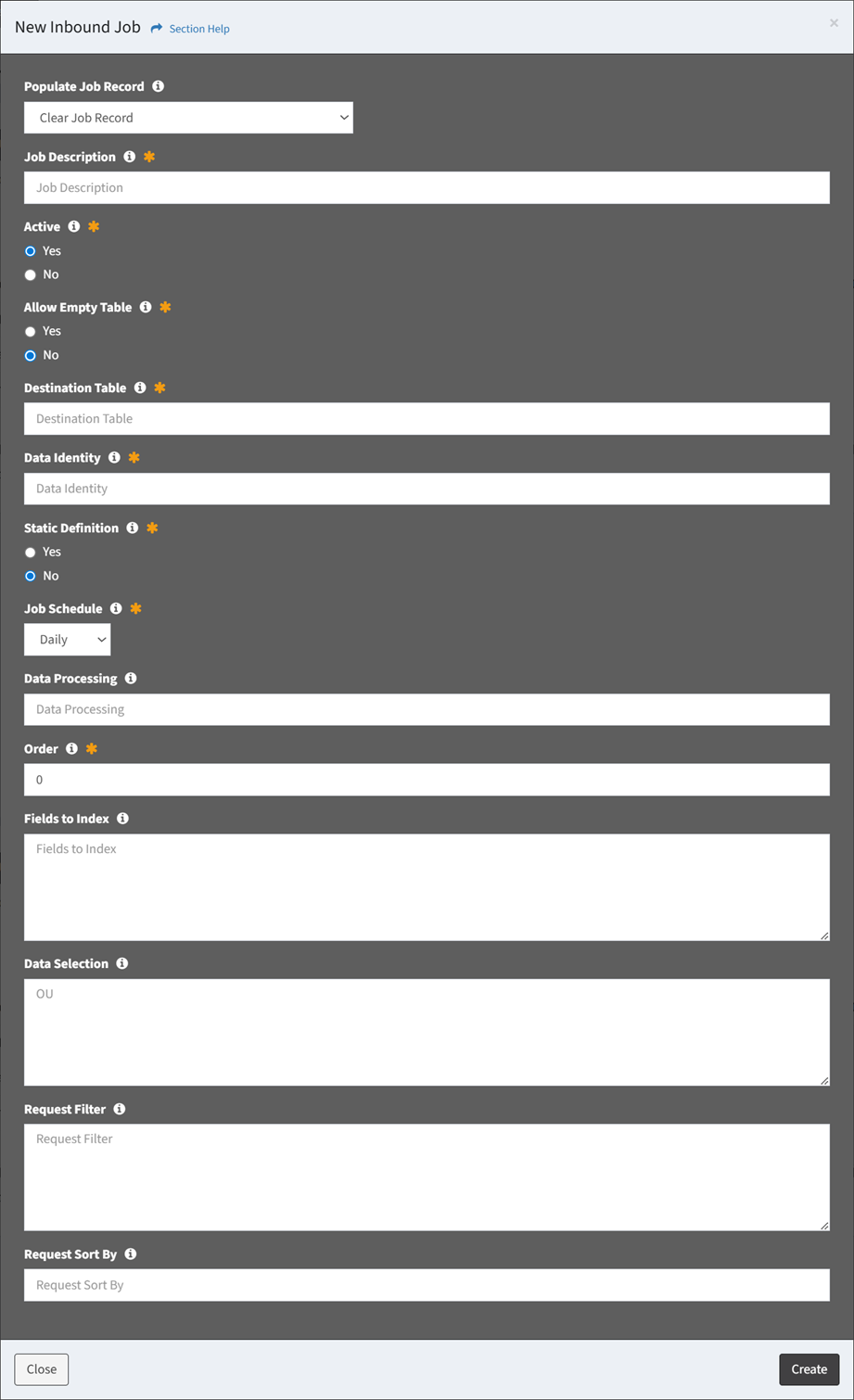
- Populate Job Record – Choose how to populate the job (required)
- Clear Job Record – Start with an empty record
- Use Template – Start with a template job
- Clone Job – Start with a clone from an existing job
- Job Description – Description of the job (required)
- Activate – Choose if job is enabled (required)
- Allow Empty Table – Choose if an empty table is allowed (required)
- Destination Table – Name of the destination table (e.g., my_table_cm_computer) (required)
- Data Identity – Identity of the data for dashboards (e.g., cm_computer) (required)
- Static Definition – Choose if the table definition is static (required)
- Job Schedule – Choose the frequency the job will run (required)
- Hourly
- Daily
- Weekly
- Custom
- Data Processing – Processing of the data (optional)
- Future field to be used for running a process against data
- Order – Choose the order the job will run at the designated frequency (required)
- Fields to Index – Fields to index (optional)
- Data Selection – Connector specific data selection command of the job (optional)
- Data Selection URL – Data selection URL of the job (optional)
- Request Filter – Fields to filter from the job (AD only) (optional)
- Request Sort By – Field to sort the job by (optional)
- Request Limit – Request limit of the job (Druva, ServiceNow and CrashPlan only) (optional)
- Request Fields – Fields requested by the job (ServiceNow only) (optional)
- Populate Job Record – Choose how to populate the job (required)
- Click the Create button when finished to create the inbound job. You will be redirected back to the Inbound Jobs tab. Click the Close button to cancel the operation.
- The new inbound job function is only available to users in the Administrator security group