

Search Knowledge Base by Keyword
-
Introduction
-
Fundamentals
-
My ReadyWorks
-
Analytics
-
-
-
- Available Reports
- All Data Types
- Application Certification Status
- Application Discovery
- Application Group Analysis
- App Group to SCCM Collection Analysis
- Application Install Count
- Application License Management
- Application Usage
- Assets by Values
- Build Sheet
- Computer User Assignment
- Data Type Column Mappings
- Delegate Relationships
- ETL5 Staging Data
- Migration Readiness (Basic)
- Migration Readiness (Complex)
- O365 License Management
- O365 Migration Readiness
- Patch Summary
- Record Count by Property
- SCCM OSD Status
- Scheduled Computers by Wave
- Scheduled Users by Manager
- User Migration Readiness
- VIP Users
- Wave & Task Details
- Wave Group
- Windows 10 Applications
- Show all articles ( 14 ) Collapse Articles
-
-
-
-
Orchestration
-
Data
-
-
- View Primary Data
- Record Properties
- Images
- Notes
- Waves
- Tasks
- Attachments
- History
- Rationalization
- QR Code
- Linked Records
- SCCM Add/Remove Programs
- Altiris Add/Remove Programs
- Related Records
- Advanced Search
- Relationship Chart
- Primary Data Permissions
- Show all articles ( 2 ) Collapse Articles
-
Integration
-
-
-
- View Connection
- Connection Properties
- Make Into Connector
- Delete Connection
- Connection Error Settings
- Inbound Jobs
- Outbound Jobs
- New Inbound Job
- New Outbound Job
- Job Error Settings
- Enable Job
- Disable Job
- Edit Inbound Job
- Edit Outbound Job
- Upload File
- Run Inbound Job
- Run Outbound Job
- Set Runtime to Now
- Reset Job
- Delete Job
- Job Log
- Show all articles ( 6 ) Collapse Articles
-
-
- View Connector
- Connector Properties
- Authentication Methods
- New Authentication Method
- Authentication Method Error Settings
- Edit Authentication Method
- Delete Authentication Method
- Fields
- Edit Field
- Inbound Job Fields
- Edit Inbound Job Field
- Inbound Job Templates
- New Inbound Job Template
- Job Template Error Settings
- Edit Inbound Job Template
- Delete Inbound Job Template
- Outbound Job Fields
- Edit Outbound Job Field
- Outbound Job Templates
- New Outbound Job Template
- Edit Outbound Job Template
- Delete Outbound Job Template
- Show all articles ( 7 ) Collapse Articles
-
-
- ETL5 Connector Info
- Absolute
- Azure Active Directory
- Cloudian
- Cohesity
- Comma-Separated Values (CSV) File
- Dell EMC
- Dell PowerFlex
- Everpure
- Generic Rest JSON API
- Generic Rest XML API
- Hitachi Vantara
- Intel Redfish
- Ivanti (Landesk)
- JAMF
- JetPatch
- JSON Data (JSON) File
- Lenovo XCLarity
- MariaDB
- Microsoft Endpoint Manager: Configuration Manager
- Microsoft Intune
- Microsoft SQL
- NetApp
- Nutanix AHV Compatibility Matrix
- Nutanix Collector
- Nutanix Move
- Nutanix Prism
- Nutanix Prism - Legacy
- Oracle MySQL
- PostgreSQL
- PowerShell: Microsoft Active Directory
- PowerShell: Oracle MySQL
- PowerShell: Microsoft SQL
- Pure Storage
- Qumulo
- RVTools
- Scality
- ServiceNow
- Simple Object Access Protocol (SOAP)
- Tanium
- Veeam
- VMware vCenter
- VMware vCenter SOAP
- XML Data (XML) File
- Show all articles ( 29 ) Collapse Articles
-
-
Admin
-
-
-
- Modules
- Attachments
- Bulk Edit
- Data Generator
- Data Mapping
- Data Quality
- ETL
- Form Builder
- Images
- Multi-Factor Authentication
- Notifications
- Rationalization
- Relationship Chart
- Reports
- Rules
- Single Sign-On
- T-Comm
- User Experience
- Show all articles ( 4 ) Collapse Articles
-
-
API
-
Administration
-
FAQs
-
Solutions
-
Accelerator – Guest OS Details
The Accelerator – Guest OS Details report provides a detailed view of the guest operating systems discovered across your virtual environment. Use this report to understand operating system distribution, identify lifecycle and compatibility risks, and support migration readiness planning.
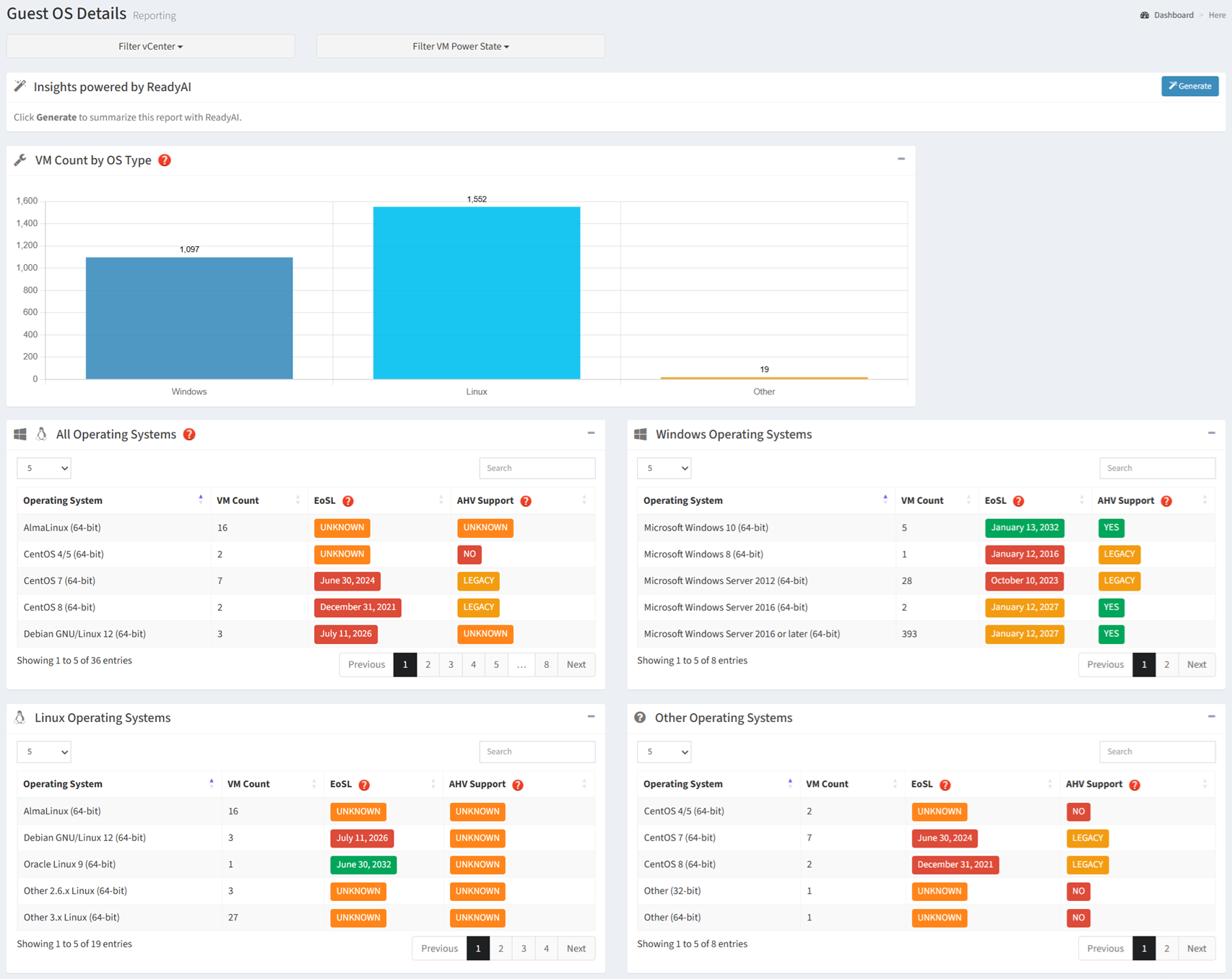
Available operations:
- View the distribution of virtual machines by operating system type
- Filter the report by vCenter and VM Power State
- Generate an AI-powered summary of the report by clicking the Generate button
- View all discovered guest operating systems
- View Windows operating system inventory
- View Linux operating system inventory
- View other operating system inventory
- View operating system End of Service Life (EoSL) information
- View Nutanix AHV guest operating system compatibility
Overview
The Guest OS Details report provides a consolidated view of guest operating system distribution, lifecycle status, and Nutanix AHV compatibility. It answers three important planning questions:
- Which guest operating systems are deployed? (Windows, Linux, and other operating systems)
- Are any operating systems approaching or past End of Service Life? (Lifecycle and support status)
- Are the operating systems compatible with the target platform? (Nutanix AHV support and potential remediation requirements)
The report consolidates operating system inventory, lifecycle, and compatibility information into a single view, allowing you to identify unsupported workloads, prioritize upgrades, and reduce migration risk.
Key Benefits
- Understand the distribution of Windows, Linux, and other guest operating systems
- Identify the number of virtual machines running each operating system
- Identify operating systems approaching or past End of Service Life (EoSL)
- Review guest operating system compatibility with Nutanix AHV
- Identify workloads that may require upgrades, remediation, or alternate migration plans
- Generate AI-powered insights and recommendations
The following sections describe how the information presented in the Guest OS Details report can be used to assess migration readiness and plan operating system remediation.
Migration Readiness
Use the information in this report to identify guest operating systems that may affect migration planning. This information helps determine which workloads can be migrated as-is, which require upgrades or remediation, and which may need an alternate target or migration approach.
| Report Section | Key Information | Planning Value |
|---|---|---|
| VM Count by OS Type | Distribution of Windows, Linux, and other operating system types | Understand the overall operating system composition of the virtual environment. |
| All Operating Systems | Complete guest operating system inventory, VM counts, EoSL, and AHV compatibility | Identify lifecycle and compatibility risks across the entire workload estate. |
| Windows Operating Systems | Windows guest operating system inventory and support status | Identify Windows workloads that may require upgrades or remediation before migration. |
| Linux Operating Systems | Linux guest operating system inventory and support status | Identify Linux workloads that may require upgrades, validation, or alternate migration plans. |
| Other Operating Systems | Guest operating systems not classified as Windows or Linux | Identify uncommon or specialized workloads that may require additional compatibility review. |
| End of Service Life | Operating system lifecycle status | Prioritize upgrades and remediation for operating systems approaching or past EoSL. |
| AHV Compatibility | Nutanix AHV support status for each guest operating system | Identify workloads that can migrate directly and those that require remediation or an alternate target platform. |
Planning Metrics
| Resource | Used For |
|---|---|
| Operating System Type | Understand the distribution of Windows, Linux, and other workloads |
| Operating System Version | Identify specific versions that may require upgrade or validation |
| VM Count | Estimate the number of workloads affected by lifecycle or compatibility issues |
| End of Service Life | Prioritize operating system upgrades and remediation |
| AHV Compatibility | Determine whether workloads can be migrated to Nutanix AHV |
Typical Workflow
The following workflow provides a recommended approach for using the Guest OS Details report during migration planning.
- Review the distribution of Windows, Linux, and other guest operating systems
- Identify the operating systems and versions with the largest virtual machine counts
- Review operating system End of Service Life status
- Identify operating systems that require upgrades or remediation
- Review Nutanix AHV compatibility for each operating system
- Identify workloads that may require an alternate target or migration approach
- Generate an AI summary for planning and stakeholder discussions
This workflow represents a recommended starting point. Depending on your migration objectives, you may revisit individual sections of the report as your assessment progresses.
Understanding Status Indicators
The Guest OS Details report uses color-coded indicators to identify operating system lifecycle status and Nutanix AHV compatibility.
Operating System End of Service Life (EoSL)
| Status | Meaning |
|---|---|
| Green | More than two years remain before the operating system reaches End of Service Life. |
| Amber | The operating system will reach End of Service Life within the next two years. |
| Red | The operating system has reached End of Service Life and should be upgraded or replaced before migration. |
| Orange | An End of Service Life date could not be determined for the operating system. |
Nutanix AHV Compatibility
| Status | Meaning |
|---|---|
| Green (Supported) | Fully supported by Nutanix for the selected AHV/AOS release. |
| Amber (Legacy Support) | Supported through legacy validation. The operating system may no longer be supported by its vendor but has been validated by Nutanix for migration and compatibility scenarios. |
| Red (Unsupported) | Not supported for the selected AHV/AOS release. |
| Orange (Unknown) | AHV support cannot be determined for the operating system. |