

Search Knowledge Base by Keyword
-
Introduction
-
Fundamentals
-
My ReadyWorks
-
Analytics
-
-
-
- Available Reports
- All Data Types
- Application Certification Status
- Application Discovery
- Application Group Analysis
- App Group to SCCM Collection Analysis
- Application Install Count
- Application License Management
- Application Usage
- Assets by Values
- Build Sheet
- Computer User Assignment
- Data Type Column Mappings
- Delegate Relationships
- ETL5 Staging Data
- Migration Readiness (Basic)
- Migration Readiness (Complex)
- O365 License Management
- O365 Migration Readiness
- Patch Summary
- Record Count by Property
- SCCM OSD Status
- Scheduled Computers by Wave
- Scheduled Users by Manager
- User Migration Readiness
- VIP Users
- Wave & Task Details
- Wave Group
- Windows 10 Applications
- Show all articles ( 14 ) Collapse Articles
-
-
-
-
Orchestration
-
Data
-
-
- View Primary Data
- Record Properties
- Images
- Notes
- Waves
- Tasks
- Attachments
- History
- Rationalization
- QR Code
- Linked Records
- SCCM Add/Remove Programs
- Altiris Add/Remove Programs
- Related Records
- Advanced Search
- Relationship Chart
- Primary Data Permissions
- Show all articles ( 2 ) Collapse Articles
-
Integration
-
-
-
- View Connection
- Connection Properties
- Make Into Connector
- Delete Connection
- Connection Error Settings
- Inbound Jobs
- Outbound Jobs
- New Inbound Job
- New Outbound Job
- Job Error Settings
- Enable Job
- Disable Job
- Edit Inbound Job
- Edit Outbound Job
- Upload File
- Run Inbound Job
- Run Outbound Job
- Set Runtime to Now
- Reset Job
- Delete Job
- Job Log
- Show all articles ( 6 ) Collapse Articles
-
-
- View Connector
- Connector Properties
- Authentication Methods
- New Authentication Method
- Authentication Method Error Settings
- Edit Authentication Method
- Delete Authentication Method
- Fields
- Edit Field
- Inbound Job Fields
- Edit Inbound Job Field
- Inbound Job Templates
- New Inbound Job Template
- Job Template Error Settings
- Edit Inbound Job Template
- Delete Inbound Job Template
- Outbound Job Fields
- Edit Outbound Job Field
- Outbound Job Templates
- New Outbound Job Template
- Edit Outbound Job Template
- Delete Outbound Job Template
- Show all articles ( 7 ) Collapse Articles
-
-
- ETL5 Connector Info
- Absolute
- Azure Active Directory
- Cloudian
- Cohesity
- Comma-Separated Values (CSV) File
- Dell EMC
- Dell PowerFlex
- Everpure
- Generic Rest JSON API
- Generic Rest XML API
- Hitachi Vantara
- Intel Redfish
- Ivanti (Landesk)
- JAMF
- JetPatch
- JSON Data (JSON) File
- Lenovo XCLarity
- MariaDB
- Microsoft Endpoint Manager: Configuration Manager
- Microsoft Intune
- Microsoft SQL
- NetApp
- Nutanix AHV Compatibility Matrix
- Nutanix Collector
- Nutanix Move
- Nutanix Prism
- Nutanix Prism - Legacy
- Oracle MySQL
- PostgreSQL
- PowerShell: Microsoft Active Directory
- PowerShell: Oracle MySQL
- PowerShell: Microsoft SQL
- Pure Storage
- Qumulo
- RVTools
- Scality
- ServiceNow
- Simple Object Access Protocol (SOAP)
- Tanium
- Veeam
- VMware vCenter
- VMware vCenter SOAP
- XML Data (XML) File
- Show all articles ( 29 ) Collapse Articles
-
-
Admin
-
-
-
- Modules
- Attachments
- Bulk Edit
- Data Generator
- Data Mapping
- Data Quality
- ETL
- Form Builder
- Images
- Multi-Factor Authentication
- Notifications
- Rationalization
- Relationship Chart
- Reports
- Rules
- Single Sign-On
- T-Comm
- User Experience
- Show all articles ( 4 ) Collapse Articles
-
-
API
-
Administration
-
FAQs
-
Solutions
-
Command & Control Dashboard
The Command & Control dashboard provides a centralized view of migration progress, workload readiness, plan status, transfer-time estimates, and migration outcomes. Use this report to monitor execution, identify stalled or failed workloads, and understand the remaining effort across migration plans.
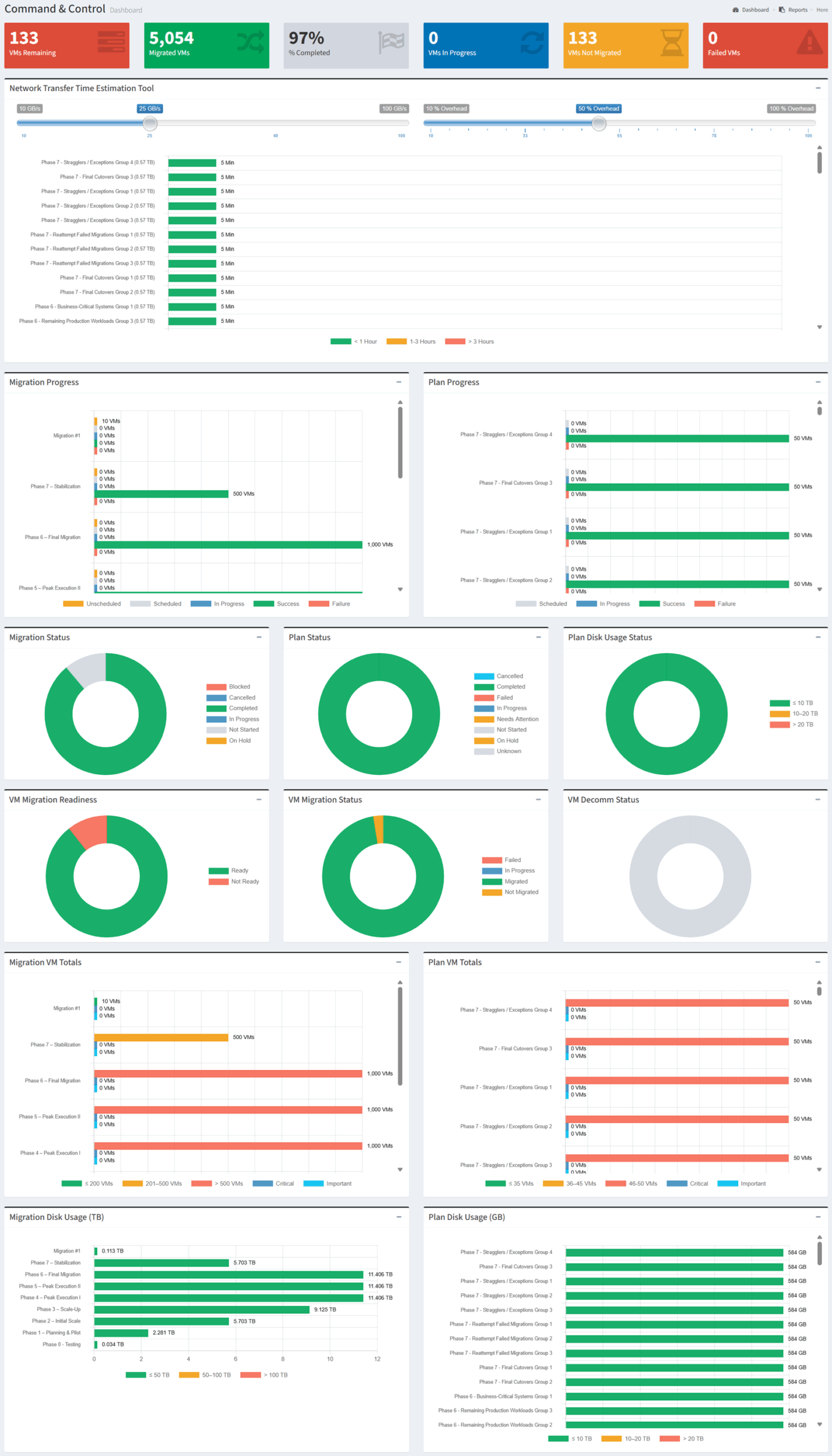
Available operations:
- View the total number of virtual machines remaining, migrated, in progress, not migrated, and failed
- View the overall percentage of virtual machines completed
- Estimate network transfer time by adjusting bandwidth and overhead assumptions
- Compare migration progress across migration groups
- Compare plan progress across plans
- View migration and plan status distributions
- View virtual machine migration readiness, migration status, and decommission status
- Compare virtual machine totals by migration group and plan
- Compare disk usage by migration group and plan
Overview
The Command & Control dashboard provides a consolidated view of migration execution and plan progress. It answers three important operational questions:
- How much of the migration is complete? (Migrated, in progress, remaining, and failed virtual machines)
- Where are workloads blocked or delayed? (Migration status, plan status, readiness, and decommission status)
- How much effort remains? (Virtual machine totals, disk usage, and estimated network transfer time)
The report combines migration, plan, readiness, capacity, and transfer-time information into a single view, allowing you to monitor progress, identify exceptions, and prioritize the work required to complete the migration.
Key Benefits
- Monitor migration progress from a single dashboard
- Identify virtual machines that are remaining, in progress, migrated, or failed
- Compare execution progress across migration groups and plans
- Estimate data-transfer duration using configurable bandwidth and overhead assumptions
- Identify workloads that are not ready, blocked, or awaiting decommission
- Understand the number and storage footprint of workloads still requiring migration
The following sections describe how the information presented in the Command & Control dashboard can be used to monitor migration execution and prioritize remediation.
Migration Monitoring
Use the information in this report to track migration completion, evaluate plan execution, and identify workloads that require attention. The report helps teams compare progress across migration groups and plans while accounting for workload count, disk usage, readiness, and transfer-time considerations.
| Report Section | Key Information | Operational Value |
|---|---|---|
| Summary Tiles | Virtual machines remaining, migrated, completed, in progress, not migrated, and failed | Provide an immediate view of overall migration status and outstanding work. |
| Network Transfer Time Estimation Tool | Estimated transfer duration based on bandwidth, overhead, and workload disk usage | Support scheduling and help determine whether available network capacity can meet migration timelines. |
| Migration Progress | Scheduled, in-progress, successful, failed, and unscheduled virtual machines by migration group | Compare execution progress and identify migration groups requiring attention. |
| Plan Progress | Scheduled, in-progress, successful, and failed virtual machines by plan | Evaluate whether individual plans are progressing as expected. |
| Migration Status | Blocked, cancelled, completed, in progress, not started, and on-hold migrations | Identify migration-level exceptions, delays, and completed work. |
| Plan Status | Cancelled, completed, failed, in progress, needs attention, not started, on hold, and unknown plans | Identify plans requiring intervention or follow-up. |
| Plan Disk Usage Status | Plans grouped by disk-usage range | Identify larger plans that may require additional time, bandwidth, or scheduling consideration. |
| VM Migration Readiness | Readiness distribution for virtual machines | Identify workloads that are ready to migrate and those requiring remediation. |
| VM Migration Status | Failed, in progress, migrated, and not migrated virtual machines | Track workload-level execution status and focus attention on failed or incomplete migrations. |
| VM Decommission Status | Virtual machine decommission state | Track post-migration cleanup and identify source workloads still awaiting decommission. |
| Migration VM Totals | Virtual machine totals by migration group and size range | Compare migration-group scale and estimate execution effort. |
| Plan VM Totals | Virtual machine totals by plan and size range | Compare plan size and identify plans with larger workload counts. |
| Migration Disk Usage | Disk usage by migration group | Estimate the data volume associated with each migration group. |
| Plan Disk Usage | Disk usage by plan | Estimate plan-level transfer requirements and support scheduling decisions. |
Monitoring Metrics
| Metric | Used For |
|---|---|
| VMs Remaining | Measure outstanding migration scope |
| Migrated VMs | Measure completed workload migrations |
| Completion Percentage | Track overall migration progress |
| VMs In Progress | Identify workloads currently being migrated |
| VMs Not Migrated | Identify workloads not yet started or completed |
| Failed VMs | Identify workloads requiring investigation or retry |
| Migration and Plan Status | Identify blocked, delayed, completed, or failed work |
| VM Readiness | Identify workloads requiring remediation before migration |
| Disk Usage | Estimate transfer volume and migration duration |
| Network Transfer Estimate | Assess whether bandwidth and scheduling assumptions support the migration timeline |
Typical Workflow
The following workflow provides a recommended approach for using the Command & Control dashboard during migration execution.
- Review the summary tiles to assess overall migration progress
- Identify failed, not migrated, or in-progress virtual machines
- Compare migration and plan progress to locate delayed or blocked work
- Review virtual machine readiness and resolve outstanding remediation items
- Use disk usage and network transfer estimates to validate migration schedules
- Monitor workload migration status through completion
- Review decommission status to confirm post-migration cleanup
This workflow represents a recommended starting point. During active migration, revisit the report regularly to track progress, investigate exceptions, and adjust schedules or remediation priorities.